Pinterest Marketing Strategies to Increase Sales & Followers
Published: 6 May 2026
Did you know that over 450 million people use Pinterest every month just to find ideas and plan purchases? Crazy, right? If your business isn’t on Pinterest yet, you’re missing out.
Don’t worry, guys, these Pinterest marketing strategies are here to help you get started. I’ll walk you through simple steps to make your pins stand out, grow your audience, and even drive traffic to your website, all in a way that’s easy to follow for beginners.
So, let’s explore this together.
Effective Pinterest Marketing Strategies
Many Pinterest marketing experts know that success begins with a strong plan. Using Pinterest as a marketing tool, you can reach a large audience and drive traffic to your business. Starting with a clear Pinterest strategy makes it easier to organize content and grow effectively.
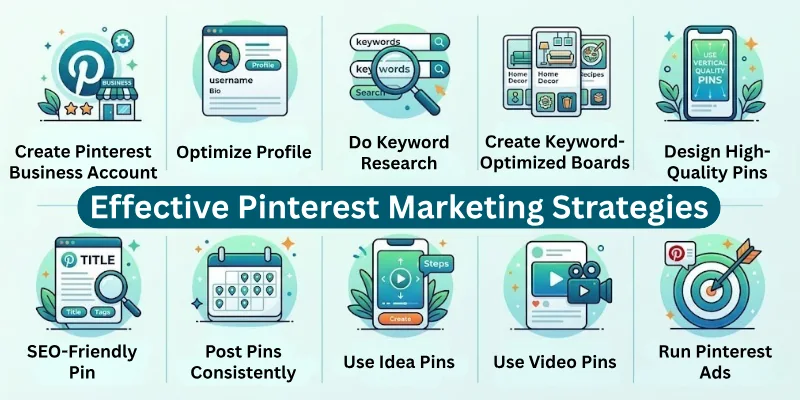
Here are the most effective marketing tips for Pinterest:
- Create a Pinterest Business Account
- Optimize Your Pinterest Profile
- Do Pinterest Keyword Research
- Create Keyword-Optimized Pinterest Boards
- Design High-Quality, Scroll-Stopping Pins
- SEO-Friendly Pin Titles and Descriptions
- Post Pins Consistently
- Use Idea Pins to Build Engagement
- Use Video Pins for More Reach
- Drive Website Traffic with Pinterest Pins
- Increase Sales with Product and Shopping Pins
- Run Pinterest Ads Strategically
- Analyze and Improve Pinterest Performance
Let’s dive into Pinterest marketing tips to help you grow your account.
1. Create a Pinterest Business Account
A business account gives you tools to grow professionally on Pinterest. It allows tracking, promoting, and understanding your audience better. Without it, you miss important features that help marketing success.
- Access analytics to track clicks, saves, and impressions
- Unlock promoted pins for paid campaigns
- Use rich pins to provide extra information
- Gain audience insights to understand followers
- Show users your account is professional
2. Optimize Your Pinterest Profile
Your profile is the first thing users see. A complete and clear profile builds trust and attracts followers. Optimized profiles also help Pinterest understand your niche and rank your content better.
- Use a professional logo or profile photo
- Write a short bio with relevant keywords
- Add your website link and contact info
- Explain your niche in simple words
- Organize sections for easier navigation
3. Do Pinterest Keyword Research
Keywords make your pins discoverable. Pinterest works like a search engine, so using the right words increases visibility. Research ensures your content reaches the right audience.
- Use the Pinterest search bar to find trending ideas
- Check the suggested search terms under the search bar
- Focus on long-tail keywords for targeted reach
- Include keywords naturally in pins, boards, and descriptions
- Observe competitors’ keywords for inspiration
4. Create Keyword-Optimized Pinterest Boards
Boards organize your pins and show Pinterest what your account covers. Keyword-rich boards help pins rank higher. Well-organized boards make it easy for users to find content.
- Create boards on clear topics
- Use keywords in board names and descriptions
- Add relevant pins to each board
- Keep boards organized and updated
- Refresh old boards with new pins
5. Design High-Quality, Scroll-Stopping Pins
Pinterest is visual, so design matters. Pins should grab attention quickly and clearly convey the message. High-quality pins get more saves, clicks, and engagement.
- Use vertical images (2:3 ratio recommended)
- Add readable text overlays
- Choose bright but clean colours
- Keep images simple and focused
- Maintain consistent branding
- Test multiple designs to see what works best
6. SEO-Friendly Pin Titles and Descriptions
Titles and descriptions help Pinterest and users understand your pins. Using keywords properly increases search visibility, and clear text encourages engagement.
- Include main keywords naturally
- Write short, helpful, and clear titles
- Describe content simply
- Add call-to-action phrases like “Click to learn more”
- Highlight benefits or solutions
- Avoid keyword stuffing
7. Post Pins Consistently
Pinterest rewards active accounts. Regular posting keeps your profile fresh and improves discoverability. Consistency also helps identify which pins perform best over time.
- Pin daily or several times per week
- Spread pins across different boards
- Use scheduling tools like Tailwind or Pinterest Scheduler.
- Share new and repurposed pins
- Monitor best days and times for posting
8. Use Idea Pins to Build Engagement
Idea Pins show step-by-step content. They are perfect for tutorials, tips, and guides. Idea Pins encourage followers to save, engage, and return for more.
- Present instructions clearly in one pin
- Focus on providing value, not selling
- Keep text and visuals simple
- Include helpful tips or tricks
- Encourage saves and shares
9. Use Video Pins for More Reach
Videos attract attention quickly and explain ideas faster. They increase engagement and reach when designed to teach or solve a problem. Even simple videos perform well if they are clear.
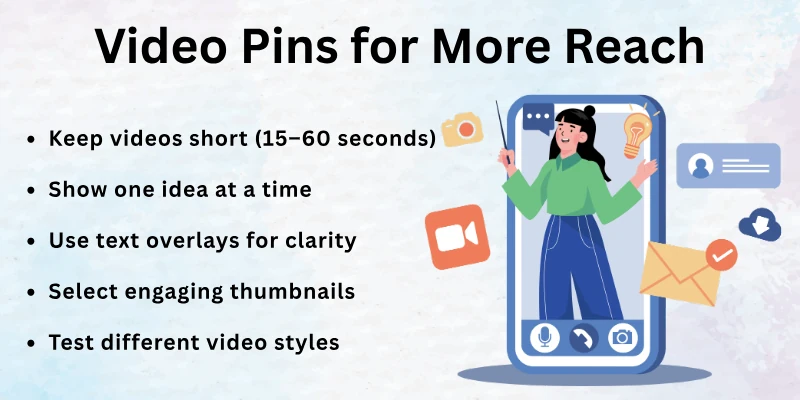
- Keep videos short (15–60 seconds)
- Show one idea at a time
- Use text overlays for clarity
- Select engaging thumbnails
- Test different video styles to see what works
10. Drive Website Traffic with Pinterest Pins
Pinterest pins can bring consistent traffic to your website. Linking pins correctly ensures users visit your blog, landing pages, or product pages. Matching pin content with page content improves results.
- Link pins to relevant pages
- Use clear call-to-action text
- Match pin visuals with page content
- Refresh old content with updated pins
- Track clicks with Pinterest analytics
11. Increase Sales with Product and Shopping Pins
Pinterest users often plan purchases. Product pins make it easier for them to buy by providing clear images, pricing, and details. Honest, well-presented product pins boost conversions.
- Use high-quality product images
- Add accurate prices and details
- Include a simple call to action
- Highlight product benefits
- Update pins when products or prices change
12. Run Pinterest Ads Strategically
Paid campaigns help boost reach and sales quickly. Promoting pins without a strategy wastes money. Testing small campaigns first ensures better results.
- Promote pins that already perform well organically
- Target the right audience with interests and keywords
- Start with a small budget
- Track results and adjust campaigns
- Avoid running too many ads at once
- Use analytics to optimize future campaigns
13. Analyze and Improve Pinterest Performance
Tracking performance is key for long-term growth. Analytics help identify which pins, boards, and strategies work best. This ensures you spend time and effort on what gives results.
- Check top-performing pins regularly
- Track saves, clicks, impressions, and traffic
- Improve weak-performing pins with new visuals or descriptions
- Repeat content that works well
- Adjust posting schedule based on insights
- Monitor audience growth and engagement trends
Pinterest Marketing Tips for Beginners
Starting on Pinterest can be simple if you focus on the right strategies. Beginners should avoid trying everything at once and instead focus on building a consistent, high-quality presence. These tips will help you get better results without feeling overwhelmed.
- Start with one niche: Pick a topic you know well and stick to it; this helps Pinterest understand your account and attract the right audience.
- Focus on quality over quantity: It’s better to create a few excellent pins than many low-quality ones; high-quality pins get more clicks and saves.
- Test and improve pins: Try different images, colours, titles, and descriptions to see what your audience likes best.
- Be patient and consistent: Pinterest growth takes time; regular posting and small improvements lead to long-term results.
- Follow similar accounts: See what works in your niche and get ideas for your own pins.
- Use Pinterest trends: Post content that matches seasonal topics or trending ideas to get extra visibility.
- Engage with other pins: Save, comment on, and share relevant content to build connections and boost your account activity.
- Create reusable pin templates: Save time and keep a consistent look across your pins.
- Add hashtags wisely: Use a few relevant hashtags in your pin descriptions to help your pins appear in searches.
- Include calls to action: Encourage users to click, save, or visit your website.
Pinterest Marketing Strategies for Sales
Pinterest is not just for ideas; it can also drive real sales. Users often come to Pinterest to plan purchases, so your pins can influence buying decisions. By showing products clearly and providing helpful information, you can turn pins into conversions and grow your business.
- Product pins: Use pins designed specifically for products; these pins show extra details like pricing, availability, and links directly to your store.
- Clear product images: Show products in high-quality, bright photos; include multiple angles if possible.
- Pricing and links: Make it easy for users to know the cost and where to buy; direct links increase conversions.
- Helpful descriptions: Explain product benefits, uses, or tips to help users make informed decisions.
- Trust with reviews or testimonials: Include user feedback or endorsements when possible.
- Seasonal or trending products: Pin products that match trends or current customer needs.
- Use lifestyle images: Show your product in real-life use to make it relatable.
- Create limited-time offers or promotions: Encourage immediate action with deals or discounts.
- Organize products into boards: Group similar products in themed boards to make browsing easier.
Pinterest Marketing Strategies for Traffic
Pinterest can drive a lot of traffic to your website, blog, or online store. The right strategies help your pins reach more people, get saved, and click through to your content. By linking pins, updating old content, and repurposing material creatively, you can steadily increase website visits.
- Link pins to blog posts: Direct pins to relevant articles, guides, or landing pages to drive traffic.
- Use fresh pins for old content: Create new designs or descriptions for older posts to give them a second chance.
- Join group boards (if relevant): Collaborate with other creators to reach a wider audience.
- Repurpose content into pins: Turn blog sections, infographics, or images into new pins.
- Add strong call-to-action text: Encourage users to click through with phrases like “Read more” or “Learn how”.
- Include relevant keywords in pins: Helps your pins appear in search results and reach the right audience.
- Use multiple pins for the same post: Different images or titles can attract different users.
- Track clicks and saves: Focus on pins that generate the most traffic and improve weaker ones.
- Share pins across boards: Pin to multiple relevant boards to increase exposure without spamming.
Final Words
This article guides Pinterest marketing strategies to help you get better results with your account. Personally, I recommend beginning with keyword research and creating eye-catching pins, because these are the foundations of success on Pinterest. Once you build a routine around these strategies, growth becomes much easier.
Take action now: try one or two strategies today and see how Pinterest can work for your business!
FAQs: Pinterest Marketing Strategy
Here’s a list of popular questions about marketing on Pinterest:
Pinterest marketing strategies are clear steps you take to make your pins work for you. These include using keywords, good images, linking pins to content, and posting regularly. They matter because they help your pins get seen, saved, and clicked more often.
First, create a business account and complete your profile. Then post helpful pins that link to your content. Use simple keyword words in titles and descriptions. Try new pin designs often and watch which pins get more engagement. This helps you grow steadily.
Pinterest marketing for business means showing products or content to people who want ideas or want to buy. Create pins that link to your site or products. Use good visuals and clear text. Track performance to know what your audience likes best.
Some ideas:
- Make pins that teach or solve a problem
- Create seasonal or holiday boards
- Try video or idea pins to explain tips
- Share pin sets (carousels) with step‑by‑step images
These ideas help your content get seen and saved more often.
You can grow without ads by:
- Posting pins regularly
- Using strong keywords in titles and descriptions
- Linking pins to helpful blog posts
- Joining relevant community boards
- Repurposing old content into fresh pins
This increases visibility without paying for traffic.
To promote products on Pinterest, use clear, bright photos that show the item well. Add pricing and a direct link to buy. Write simple descriptions that explain what the product does. You can also use Pinterest shopping pins to make it easier for people to buy.
Yes, Pinterest works as a marketing tool because users come to find ideas and plan purchases. Small businesses can show products, tips, or guides with pins. Good pins send people to your website or store and help build trust over time.
Engagement means how much users interact with your pins. You get more engagement by making helpful pins, using clear text on images, and posting consistently. Also, save and comment on other relevant pins to increase interaction with your account.
A good posting schedule is regular and steady. It’s better to pin a few times every day than many pins in one day and none for a week. This helps Pinterest show your content more often and improves your reach over time.
Yes, Pinterest marketing strategies help blogs and websites by sending steady traffic. When you link pins to your blog posts with clear images and keywords, interested users click through to read more. This boosts visit numbers and builds loyal readers.



- Be Respectful
- Stay Relevant
- Stay Positive
- True Feedback
- Encourage Discussion
- Avoid Spamming
- No Fake News
- Don't Copy-Paste
- No Personal Attacks
- Be Respectful
- Stay Relevant
- Stay Positive
- True Feedback
- Encourage Discussion
- Avoid Spamming
- No Fake News
- Don't Copy-Paste
- No Personal Attacks
