Types of Blog Posts – Easy Tips to Make Your Blog More Popular
Published: 22 Mar 2026
Writing a blog can feel really overwhelming, especially when you do not know what to write or how to organize your ideas. I remember staring at a blank screen, unsure where to start, and feeling frustrated because I wanted my blog to help people.
Then I discovered the different types of blog content, and everything started to make sense. Using the right type, like a how-to post, a list, or a review, made writing easier, kept my readers interested, and gave me the confidence to plan my content better.
In this article, we will cover all the types of blog posts, showing how each works and when to use it. You will also get tips and examples to help you choose the right style for your blog.
So why are you waiting? Start exploring and find the ones that fit your blog best.
Blog Post Types
There are many types of blog content you can write, and each one has its own purpose. Picking the right type makes your blog more fun to read and helps you reach your readers better.
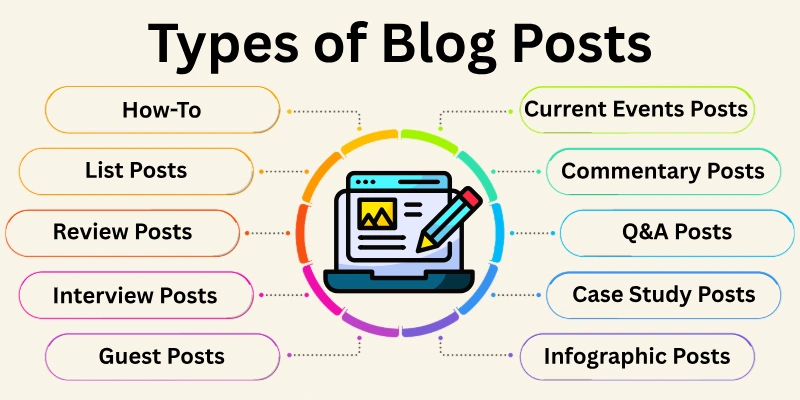
Here is the list of blog categories:
- How-To or Tutorial Posts
- List Posts
- News or Current Events Posts
- Opinion or Commentary Posts
- Comparison or Review Posts
- FAQ or Q&A Posts
- Interview Posts
- Case Study Posts
- Guest Posts
- Resource or Round-Up Posts
- Evergreen Content Posts
- Infographic Posts
- Video Blog (Vlog) Posts
- Podcast or Audio Blog Posts
Let’s discuss the types of blog content one by one.
1. How-To or Tutorial Posts
A how-to or tutorial post is a blog that teaches readers how to do something step by step. It explains a process clearly so that even beginners can follow without confusion. These posts are practical and help readers solve a problem or learn a new skill.
Example:
“How to Bake a Chocolate Cake”, “How to Start a YouTube Channel”, “How to Create a Study Schedule”. These posts can cover anything from cooking and technology to everyday life tips.
When to use it:
Use how-to posts whenever you want to guide readers through a process or teach something useful. They are perfect for beginners looking for clear, actionable instructions.
Tips:
- Break instructions into short, easy-to-read steps.
- Use images, screenshots, or videos to make the process clear.
- Write in simple words and active voice so readers can follow easily.
- Give practical examples readers can try on their own.
2. List Posts
List posts, or “listicles”, are blogs organized as lists. They make information easy to scan and understand. Each item in the list usually contains a small explanation, tip, or example, making it perfect for readers who want quick and useful information.
Example:
“10 Best Apps for Students”, “7 Tips for Healthy Eating”, “5 Easy Exercises for Beginners”. Lists can cover almost any topic and give readers fast answers.
When to use it:
Use list posts when you want to provide information quickly and clearly. They are great for readers who prefer skimming and learning fast.
Tips:
- Use numbers or bullet points for easy scanning.
- Keep each point short but informative.
- Add examples or small stories to make it relatable.
- Use subheadings for longer lists to improve readability.
3. News or Current Events Posts
News posts report recent events, updates, or trends in a specific field. They inform readers about what is happening now, often including facts, dates, and quotes. These posts are usually timely and show that your blog stays updated.
Example:
“New Social Media Trends in 2025”, “Tech Gadgets Released This Month”, “Recent Changes in Education Policy”. News posts can cover any industry or area of interest.
When to use it:
Use news posts to keep your readers informed and engaged with the latest developments. They are excellent for blogs that want to build credibility and authority.
Tips:
- Make sure your facts are accurate and up-to-date.
- Link to reliable sources to boost credibility.
- Keep paragraphs short and easy to read.
- Highlight key points with bold text or bullet points for clarity.
4. Opinion or Commentary Posts
Opinion posts share your thoughts, views, or analysis about a topic. They allow you to express your perspective and engage readers in discussion. These posts are personal, showing your expertise and unique voice.
Example:
“Why Remote Work is the Future”, “The Pros and Cons of Social Media for Kids”, “Why Everyone Should Learn a New Language”. Opinion posts let you share your ideas while giving readers something to think about.
When to use it:
Use opinion posts when you want to share insights, start discussions, or influence readers’ thinking. They are effective for showing expertise and personality.
Tips:
- Clearly state your opinion at the beginning.
- Support your ideas with facts, examples, or personal experiences.
- Encourage readers to comment and share their thoughts.
- Keep your tone friendly yet professional.
5. Comparison or Review Posts
Comparison or review posts analyze products, services, or tools to help readers decide which is best. They usually highlight pros, cons, features, and differences. These posts are helpful for readers making choices or purchases.
Example:
“iPhone vs Samsung: Which Should You Buy?” “Top 5 Laptops for Students in 2025,” “Review of the Best Online Learning Platforms.”
When to use it:
Use comparison posts when readers need guidance to choose between options. Reviews help build trust and give practical advice.
Tips:
- Be honest and unbiased in your evaluation.
- Include pros and cons for each option.
- Add images or screenshots to show details.
- Summarize your recommendation clearly at the end.
6. FAQ or Q&A Posts
FAQ posts answer common questions about a topic. They are easy to read and help solve readers’ doubts quickly. These posts are often structured with headings for each question.
Example:
“FAQs About Starting a Blog,” “Q&A on Healthy Eating Tips”, “Common Questions About Online Classes”.
When to use it:
Use FAQ posts when readers need fast answers or clarification. They improve user experience and can boost SEO with targeted questions.
Tips:
- Write clear, simple questions that readers might ask.
- Provide concise and helpful answers.
- Organize each question under a heading for easy scanning.
- Include links to other related posts for more detail.
7. Interview Posts
Interview posts feature a conversation with an expert, influencer, or interesting person. They share insights, experiences, or advice from someone else’s perspective. These posts are valuable because they bring authority and credibility.
Example:
“Interview with a Successful Blogger”, “Q&A with a Nutrition Expert,” “Tips from a Professional Photographer”.
When to use it:
Use interview posts to provide expert opinions, fresh perspectives, or advice. They are great for adding credibility to your blog.
Tips:
- Prepare clear, engaging questions.
- Highlight interesting answers for readers.
- Add a short bio of the person you interview.
- Include images or quotes to make the post visually appealing.
8. Case Study Posts
Case study posts show real-life examples of success, results, or problem-solving. They explain what was done, how it was done, and what the outcome was. Case studies are informative and help readers learn from real experiences.
Example:
“How a Small Business Increased Sales Using Social Media”, “Student Success Story: Improving Grades with Study Apps”, “How a Blogger Grew Traffic in 3 Months.”
When to use it:
Use case studies to show practical results, inspire readers, or demonstrate your expertise. They are superb for teaching lessons through real examples.
Tips:
- Include clear steps or actions taken in the case study.
- Show measurable results when possible.
- Add images, graphs, or screenshots for clarity.
- Explain lessons readers can apply to their own situations.
9. Guest Posts
Guest posts are written by someone else and published on your blog. They bring fresh perspectives, experiences, or expertise from another writer. Guest posts also help expand your reach and network.
Example:
“A Nutrition Expert’s Guide to Healthy Snacks”, “Tips from a Travel Blogger for Students”, “How a Teacher Uses Technology in the Classroom”.
When to use it:
Use guest posts to provide variety, introduce new ideas, or bring expert opinions to your blog. They also help in building relationships with other bloggers.
Tips:
- Make sure the content is relevant to your audience.
- Check the quality and originality of the post.
- Add a short bio and links for the guest author.
- Engage readers by encouraging comments or discussion.
10. Resource or Round-Up Posts
Resource or round-up posts collect useful tools, tips, or information from multiple sources. They give readers a one-stop guide to find everything they need on a topic.
Example:
“Top 20 Free Apps for Students,” “Best Websites for Learning Coding”, “Resources Every Blogger Should Know”.
When to use it:
Use these posts to provide value by gathering useful resources in one place. They are great for beginners and for saving readers time.
Tips:
- Organize resources clearly with headings or bullets.
- Include links and short descriptions for each resource.
- Keep content updated regularly.
- Add your own tips or insights to make it personal.
11. Evergreen Content Posts
Evergreen posts are content that stays relevant for a long time. They provide information that does not go out of date quickly. These posts attract readers continuously and are great for long-term traffic.
Example:
“How to Start a Blog”, “Basic Study Tips for Students”, “Essential Grammar Rules Everyone Should Know”.
When to use it:
Use evergreen posts to provide lasting value. They are excellent for building authority and consistently attracting readers.
Tips:
- Focus on timeless topics that remain useful.
- Update occasionally to keep information accurate.
- Use clear headings for easy reading.
- Include examples that are simple and easy to understand.
12. Infographic Posts
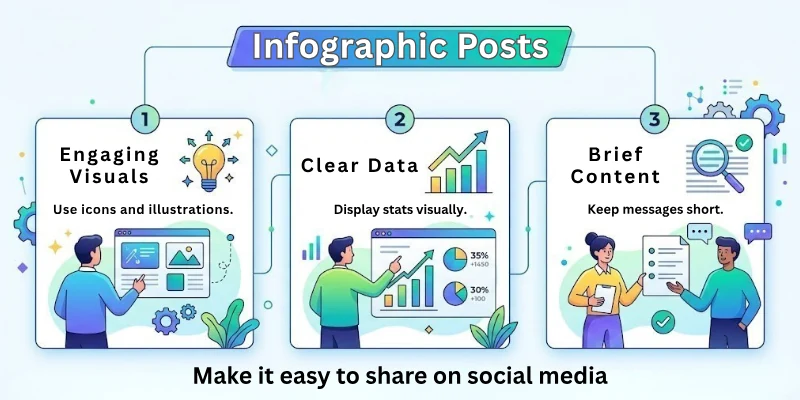
Infographic posts use visuals to explain information or data. They combine text, images, and graphics to make complex topics easy to understand. Infographics are very shareable and appealing.
Example:
“Steps to Write a Blog Post (Infographic),” “Nutrition Facts in Simple Charts” and “Study Tips Visual Guide for Students.”
When to use it:
Use infographic posts to explain data, statistics, or processes visually. They are excellent for readers who prefer visual learning.
Tips:
- Keep visuals clear and simple.
- Highlight important points with colours or icons.
- Include short text explanations alongside graphics.
- Make it easy to share on social media.
13. Video Blog (Vlog) Posts
Vlog posts focus on video content rather than written text. They explain, teach, or share experiences using video, often supported with a short text description. Vlogs are engaging and appealing for visual learners.
Example:
“Vlog: A Day in the Life of a Student,” “Tutorial Video: How to Use Canva,” “Travel Vlog: Exploring a New City”
When to use it:
Use vlogs to make content more interactive and visually appealing. They are great for tutorials, personal stories, or demonstrations.
Tips:
- Keep videos short and focused.
- Add captions or subtitles for clarity.
- Include a short text summary for SEO and readers who prefer reading.
- Make videos engaging with a friendly, natural tone.
14. Podcast or Audio Blog Posts
Podcasts or audio posts deliver content through sound instead of text. They can be interviews, storytelling, or discussions. Audio blogs are convenient for readers who like to listen on the go.
Example:
“Podcast: Tips for Learning English,” “Audio Interview with a Blogger,” “Storytelling Podcast: Study Success Stories.”
When to use it:
Use podcasts to reach readers who prefer listening over reading. They are excellent for interviews, discussions, or personal stories.
Tips:
- Keep audio clear and easy to understand.
- Speak naturally and use a friendly tone.
- Include a short text summary for readers and SEO.
- Encourage listeners to comment or share their thoughts.
How to Choose the Right Blog Post Type for Your Topic
When I first started blogging, I often chose the wrong post type. Sometimes I wrote long guides when readers wanted quick answers. Other times, I shared opinions when people were looking for clear steps.
Over time, I learnt that choosing the right blog post type makes writing easier and helps readers understand my message better. Once I matched the topic with the right format, my content felt clearer and more useful.
- Goal: Know what you want to achieve, such as teaching, informing, or sharing an opinion.
- Audience: Think about who will read your post and what they need right now.
- Topic: Match the topic with the format that explains it best.
- Clarity: Pick a type that keeps the message simple and easy to follow.
- Value: Choose a format that gives real help to your readers.
- Engagement: Use a post type that encourages readers to read till the end.
This approach helps you write with confidence and keeps your blog focused and helpful for students and beginners.
Best Content Formats for Blog Traffic
When I started blogging, I thought writing good content was enough to get traffic. But I soon realized that format matters just as much as the topic.
Some posts brought steady visitors, while others stayed unnoticed. After testing different styles, I learnt which content formats actually attract readers and keep them on the page longer.
- How-To: Teaches readers how to solve a problem in clear steps.
- List: Makes information easy to scan and quick to understand.
- Evergreen: Brings traffic over time because the topic stays useful.
- Comparison: Helps readers choose between options with confidence.
- FAQ: Answers common questions people search for on Google.
- Case-Study: Builds trust by showing real results and experiences.
- Video: Keeps users engaged and improves time spent on the page.
Using the right content format helps your blog reach more people, rank better on Google, and stay helpful for students and beginners.
Wrapping Up
In this article, we have discussed the types of blog posts that really matter for creating a successful blog. Using the right post format at the right time makes all the difference, as no blog grows by accident.
A case study builds genuine trust, a how-to guide keeps readers engaged, and a list post grabs attention. That is why understanding the different types of blog content is so important.
When you plan your content with clear formats, ideas flow more easily and results improve. Don’t miss the next section of the FAQs, which we cover here.
FAQs: Types of Blog Posts
Have questions about blog post types? Here are some FAQs to help you get answers quickly.
Blogging content can be written in many styles, like how-to posts, listicles, stories, or case studies. Each type serves a different purpose and helps reach readers in unique ways.
Using different types of blog posts makes your blog more engaging. Some types attract more visitors, some help with SEO, and some keep readers on your page longer. Mixing formats ensures your content stays fresh and useful for everyone.
A list post shows information in numbered or bulleted points. It is easy to read and helps readers find tips quickly. For example:
- “10 tools for bloggers”
- “5 ways to grow your audience”
- “7 steps to improve SEO”
A how-to post teaches readers step by step how to do something. It solves problems and is useful for beginners. For example, “How to start a blog in 5 steps” is a popular how-to blog post type.
Yes. Story posts share real-life experiences or lessons. Readers connect emotionally with stories. They make your blog personal and enjoyable. Examples include personal success stories or lessons learnt from challenges.
Listicles and how-to posts are among the most popular types of blogs. Readers like them because they are easy to read, informative, and give quick answers to their questions.
FAQ or question-answer posts help your blog appear in search results. They answer real questions that people type into Google. Benefits include:
- Improved visibility on search engines
- Clear answers that readers can quickly understand
- Increased chances of getting clicks and traffic
Yes, mixing types is effective. You can combine lists with how-to instructions or storytelling with tips. Mixed formats keep readers engaged and help your content rank better on search engines.
A comparison post looks at two or more things side by side. For example, “WordPress vs Blogger”. It helps readers make decisions by showing pros and cons clearly. Comparison posts are helpful for product reviews or tool selections.
You can post blogs on platforms like WordPress, Blogger, Medium, or LinkedIn. Social media sites and company websites are also great places to share your blogging content.




- Be Respectful
- Stay Relevant
- Stay Positive
- True Feedback
- Encourage Discussion
- Avoid Spamming
- No Fake News
- Don't Copy-Paste
- No Personal Attacks
- Be Respectful
- Stay Relevant
- Stay Positive
- True Feedback
- Encourage Discussion
- Avoid Spamming
- No Fake News
- Don't Copy-Paste
- No Personal Attacks
