What Is the Difference Between Search Ads and Display Ads?
Published: 26 Nov 2026
Guys, trying to pick the right online ads can feel really confusing when you are just starting out. You spend time and money, yet you still wonder where your ads should show up and why one gets clicks while the other does not. That is where display advertising vs search advertising comes in.
It is super easy to mix these two up at first. Both help businesses reach people online, yet they show up at different times and look very different. You do not need any big or tricky tech words to understand them. Once you see how each one works, it is honestly a piece of cake.
In this guide, I will break down search advertising vs display advertising in super simple words. We will look at easy examples, a quick comparison table, the main differences, handy tips, my final thoughts, and answers to common questions.
Ready to dive in? Let us go!
What Is Search Advertising?
Search advertising is a type of paid online ad that lets a business show its ad on a search page like Google when people look for a product, a service, or an answer.
For example, when you type “buy running shoes” on Google, you may see small “Sponsored” links right at the top of the page. Those links are paid ads from shoe shops that want to reach people looking for running shoes.
Businesses usually pay only when someone clicks on their ad. This is called Pay-Per-Click (PPC).
Search advertising helps a business reach people who are already looking for what it sells. It brings more visitors to its website and helps it get more buyers.
What Is Display Advertising?
Display advertising is a type of paid online ad that lets a business show picture or video ads on websites, blogs, and apps while people are reading or browsing online.
For example, when you are reading a blog about baking a cake, you might see a bright picture ad for a mixing bowl on the side of the screen. You did not search for a bowl, yet the ad shows up while you read.
Businesses can pay when people see the ad or when someone clicks on it.
Display advertising helps a business catch people’s eyes with bright pictures. It helps more people notice the shop and remember its name later.
Search vs Display Advertising: Quick Comparison
Here is a quick table that compares display vs search advertising side by side. It helps you see the main points right away.
| Comparison Point | Search Advertising | Display Advertising |
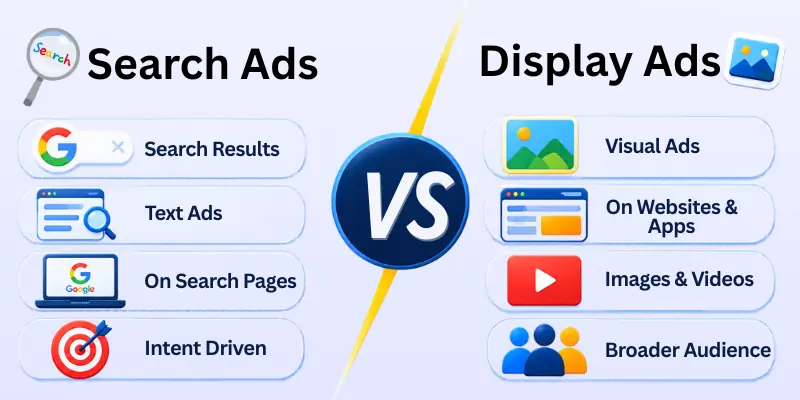
| Main Idea | Shows ads after someone types words to search | Shows picture ads while someone reads or plays online |
| How It Looks | Short lines of words and a link | Bright pictures, banners, and short videos |
| Where It Shows Up | On search pages like Google | On websites, blogs, games, and apps |
| What People Are Doing | Looking for an answer or ready to buy | Just reading, watching, or looking around |
| Main Strength | Matches what people just asked for | Catches people’s eyes and helps them remember a name |
Search Advertising vs Display Advertising: Key Differences
In this section, we will compare search advertising and display advertising step by step. Seeing how each factor differs helps you understand how both ad types work in real life.
- Ad Placement
- Ad Format
- User Intent
- Audience Targeting
- Payment and Cost
- Click Rate
- Setup Time
Now, let’s explore each difference in detail.
1. Ad Placement
Ad placement means where an ad shows up on the internet. This matters because the spot decides where people notice your message during their day.
Search Advertising
- Shows up on search result pages like Google right after someone types words.
- Usually sits near the top or bottom of the search list.
- Stays inside the search engine rather than spreading across other websites.
Display Advertising
- Shows up across many partner websites, blogs, news pages, games, and apps.
- Often sits on the side of a screen, at the top banner, or inside an article.
- Reaches people while they visit lots of different places online.
2. Ad Format
Ad format means what an ad looks like and how much space it uses. This matters because text and pictures grab attention in very different ways.
Search Advertising
- Uses a small, neat text box with a headline, two or three short lines, and a link.
- Follows the same clean look as regular search results.
- Leaves little room for logos, photos, or fancy colors.
Display Advertising
- Uses bright photos, colorful banners, drawings, or short video clips.
- Comes in many sizes, from tall side boxes to wide top banners.
- Lets people see what a product looks like right on the screen.
3. User Intent
User intent means what a person is trying to do online and how close they are to buying. This matters because someone looking for help acts differently from someone just relaxing.
Search Advertising
- Reaches people who just typed a question or item name to find an answer.
- Fits the final buying stage when someone is ready to pick a shop.
- Connects with people who want a quick fix or product today.
Display Advertising
- Reaches people who are reading a story, playing a game, or watching a video.
- Fits the early stage when someone is just learning about a new brand or idea.
- Plants a seed before the person even thinks about searching.
4. Audience Targeting
Audience targeting means how a business picks who sees its ad. This matters because choosing the right group helps your ad reach people who care.
Search Advertising
- Matches ads to the exact words someone types into the search box.
- Shows up only when a person brings up that topic or problem.
- Focuses on what someone asks for at that second.
Display Advertising
- Matches ads to website topics, reader hobbies, or past site visitors.
- Can remind people who visited a website earlier to come back later.
- Reaches new groups of people even if they have never searched for the item.
5. Payment and Cost
Payment and cost mean how a business pays for the ad and how much money it usually takes. This matters because every business wants to spend its budget wisely.
Search Advertising
- Mostly uses pay-per-click, so a business pays when someone taps the ad.
- Individual clicks often cost more because many shops bid on the same popular words.
- Works well when those clicks turn into real orders.
Display Advertising
- Can charge either when many people view the ad or when someone clicks it.
- Views and clicks often cost less than search clicks.
- Helps show a message to thousands of people on a smaller budget.
6. Click Rate
Click rate means how often people tap on an ad after seeing it. This matters because one ad type gets quick taps while the other gets more quiet views.
Search Advertising
- Often gets more clicks because people already asked for that exact item.
- Feels like a helpful next step right after typing a search.
- Turns active searches into direct website visits.
Display Advertising
- Often gets fewer quick clicks while people are busy reading or playing.
- Gets lots of views that help people remember a brand name later.
- Works slowly to build trust before a person decides to tap.
7. Setup Time
Setup time means how fast and easy it is to build an ad and get it running. This matters because some ads take minutes to write while others need design work.
Search Advertising
- Takes very little time to create because you mainly write short lines of text.
- Needs no drawing, photo editing, or video work before starting.
- Easy to edit a few words if you want to test a new offer.
Display Advertising
- Takes longer to prepare because you must create images, banners, or videos.
- Often needs several picture sizes to fit phones, tablets, and computers.
- Requires extra design checks so words on the picture stay easy to read.
When Should You Use Search Ads vs Display Advertising?
Picking between display ads vs search ads depends on what you want your ad to do right now. Each one works best at a different time:
Use Search Advertising When:
- People already search for it: Shoppers are typing words for what you sell.
- The need is fast: Someone needs quick help, a repair, or an item today.
- Words are enough: You can explain what you offer in a few short lines.
Use Display Advertising When:
- Pictures help sell it: Items like shoes, clothes, toys, or food look great in photos.
- You want more people to know you: You want lots of people to see and remember your shop’s name.
- You want to remind past visitors: You want people who visited your website earlier to see your ad again.
For example, if someone types “bike repair near me” on Google, a search ad helps right away. If you sell bright, colourful skateboards, a fun picture ad on a skate blog will catch a reader’s eye.
Final Note
In this guide, we have explained search ads vs display ads in simple words. We looked at how both types of ads work, compared their features, discussed their main differences, and explained when to use each one. We also covered how they can work together and which option is better for beginners.
In my opinion, start with search advertising if people are already searching for your products or services. Choose display advertising if you want to show your products through pictures or help more people know your brand.
Now you understand how both ad types work and what makes them different. Check out the FAQs below if you have more questions, and choose the option that best matches your business goals.
Simple FAQs
Here are answers to common questions about search advertising and display advertising:
1. What is the main difference between search advertising and display advertising?
Search advertising shows mostly text ads when people type search words, while display advertising shows visual ads like banners or images while people browse websites and apps. Search ads meet active searchers, and display ads catch people while they read or scroll.
2. Which ad type is easier for a beginner to understand?
Search advertising is often easier for beginners to start with because it focuses on clear words and matches what people just searched for. Display advertising is also simple to spot, but making good images and picking placements takes extra practice.
3. Do display ads always use pictures?
Most display ads use images, banners, or videos, though some can look simple depending on the ad space.
- Images and banners: Great for showing products, colors, or sales.
- Short videos: Helpful for showing how something moves or works.
- Text elements: Often paired with a small picture and button. Visuals are the main reason people notice display ads while browsing.
4. Can search ads show up on blogs and news sites?
Usually, search ads appear on search result pages rather than inside regular blog articles. Display ads are the ones that commonly appear on blogs, news sites, and apps.
5. Why do people use display ads if search ads match what people look for?
Display ads help businesses reach people who have not searched yet. A colorful banner can spark interest while someone is reading a page or remind someone who visited a site earlier.
6. Are search ads only made of words?
Search ads are mainly text, such as a short title, a short description, and a link. Sometimes extra details like a phone number or extra links can also show up with the text.
7. Which option is better for a small business?
It depends on what the small business sells and how people look for it.
- Local or urgent help: A search ad helps when nearby people search for that service.
- Visual products: A display ad helps when photos show off the item well. Starting with the option that fits your customers’ habits works best.
8. Do people click display ads as often as search ads?
People often click search ads more often because they already searched for that topic. Display ads may get seen by many eyes while people browse, even if fewer people click right away.
9. Can a website run both search ads and display ads at the same time?
Yes, many websites run both types of ads. One helps catch people who are searching right now, while the other helps build awareness across the web.
10. What should I check before choosing search or display ads?
First, check what you are offering and whether it looks better as words or pictures. Next, think about whether your visitors are actively searching for a solution or just browsing the web.



- Be Respectful
- Stay Relevant
- Stay Positive
- True Feedback
- Encourage Discussion
- Avoid Spamming
- No Fake News
- Don't Copy-Paste
- No Personal Attacks
- Be Respectful
- Stay Relevant
- Stay Positive
- True Feedback
- Encourage Discussion
- Avoid Spamming
- No Fake News
- Don't Copy-Paste
- No Personal Attacks
