15 Common Types of CTA and When to Use Them
Published: 24 Nov 2026
Have you ever visited a website and seen buttons like “Sign Up”, “Buy Now”, or “Learn More”? These small messages may look simple, but they encourage people to take action. Without them, visitors may not know what to do next.
There are many types of CTA that businesses use to guide people. Some encourage visitors to buy products, while others ask them to subscribe to emails, download files, register for events, or contact a business.
In this guide, we will explore 15 common types of calls to action with simple explanations and real-life examples. You will learn what each CTA does, where businesses use it, and how it helps people take the next step.
Let’s look at the different types of CTAs and understand how they work.
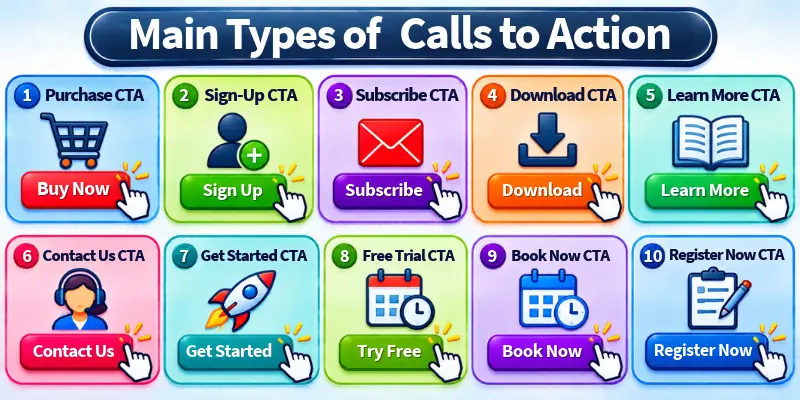
Main Types of Calls to Action
Different types of CTA serve different purposes. Some encourage people to buy products, while others help businesses attract visitors and build strong relationships with customers.
Here are 15 common CTA types:
- Purchase CTA
- Sign-Up CTA
- Subscribe CTA
- Download CTA
- Learn More CTA
- Contact Us CTA
- Get Started CTA
- Free Trial CTA
- Book Now CTA
- Register Now CTA
- Share CTA
- Follow CTA
- Read More CTA
- Watch Now CTA
- Get a Quote CTA
Now, let’s understand each type with simple explanations and examples.
1. Purchase CTA
A purchase CTA encourages people to buy a product or service. It is one of the most common call to action types used by online stores and businesses.
When customers find something they like, a purchase button gives them a clear way to place an order. It helps them move from looking at a product to buying it.
- Main Goal: Encourage customers to complete a purchase.
- Common Examples: “Buy Now,” “Shop Now,” and “Add to Cart.”
- Where It Happens: Online stores, product pages, shopping apps, and advertisements.
- Real-Life Example: An online shoe store adds a “Buy Now” button below each pair of shoes.
Quick Reminder: Make sure your purchase button takes customers directly to the correct product or checkout page so they can complete their order easily.
2. Sign-Up CTA
A sign-up CTA asks people to create an account on a website, app, or online service. Users usually provide basic details, such as their name, email address, and password.
Businesses use this CTA to attract new users and help them access their services. It is common on websites that offer online courses, shopping accounts, and digital tools.
- Main Goal: Get new users to create an account.
- Common Examples: “Sign Up,” “Create an Account,” and “Join Us.”
- Where It Happens: Websites, mobile apps, online learning platforms, and membership sites.
- Real-Life Example: A student visits an online learning website and clicks “Sign Up” to create a free account.
Keep in Mind: A simple registration process can encourage more people to create an account. Only ask for the information you really need.
3. Subscribe CTA
A subscribe CTA encourages people to receive regular updates from a business, website, or content creator. People usually enter their email address to join a mailing list.
Businesses use this CTA to stay connected with their audience. They can send news, useful tips, product updates, and special offers to subscribers.
- Main Goal: Build an email subscriber list.
- Common Examples: “Subscribe Now,” “Get Updates,” and “Join Our Newsletter.”
- Where It Happens: Blogs, news websites, YouTube channels, and email marketing pages.
- Real-Life Example: A reader enjoys a blog and enters their email address after clicking “Subscribe to Our Newsletter.”
Important to Know: Always tell people what type of emails they will receive and avoid sending unwanted messages to your subscribers.
4. Download CTA
A download CTA asks people to download a file, document, app, or other digital resource. It may offer something free or provide access to a paid product.
This CTA works well when businesses want to share helpful resources with their audience. Students, teachers, and professionals can also use it to access useful learning materials.
- Main Goal: Encourage people to download digital content.
- Common Examples: “Download Now,” “Get Your Free Guide,” and “Download the App.”
- Where It Happens: Blogs, websites, mobile apps, and online resource pages.
- Real-Life Example: A student visits an educational website and clicks “Download Notes” to save study material.
A Useful Tip: Clearly mention whether the download is free or paid so visitors know what to expect before clicking.
5. Learn More CTA
A learn more CTA encourages visitors to discover additional information about a product, service, or topic. It usually takes them to another page with more details.
Businesses use this CTA when visitors may need more information before making a decision. It gives people a chance to understand an offer without asking them to buy immediately.
- Main Goal: Help visitors understand something better.
- Common Examples: “Learn More,” “Explore Details,” and “Discover More.”
- Where It Happens: Business websites, product pages, advertisements, and blog posts.
- Real-Life Example: A person visits a website that offers online courses and clicks “Learn More” to see course details.
Key Takeaway: Place this CTA near information that may interest visitors and make sure the next page answers their questions.
6. Contact Us CTA
A contact CTA invites visitors to communicate with a business or service provider. It may take them to a contact form, email address, phone number, or messaging service.
This CTA is useful when people have questions or need help before choosing a service. It also gives businesses a chance to understand what their potential customers need.
- Main Goal: Encourage people to contact a business.
- Common Examples: “Contact Us,” “Talk to Our Team,” and “Send Us a Message.”
- Where It Happens: Business websites, service pages, landing pages, and advertisements.
- Real-Life Example: Someone needs a website designed and clicks “Contact Us” to ask a web design company about its services.
Remember: Make it easy for visitors to find your contact details or submit their questions. A difficult contact process may discourage potential customers.
7. Get Started CTA
A get started CTA encourages people to begin using a product, service, or online platform. It usually takes visitors to a registration page, setup process, or first step.
Businesses use this CTA when they want to make it easy for new users to begin. It works especially well for software, apps, online tools, and digital services.
- Main Goal: Encourage people to take the first step.
- Common Examples: “Get Started,” “Start Today,” and “Start Building.”
- Where It Happens: Software websites, online tools, mobile apps, and service pages.
- Real-Life Example: A person visits an online design tool and clicks “Get Started” to begin creating a poster.
Quick Reminder: Take users to a clear starting point instead of making them search for the first step after clicking the button.
8. Free Trial CTA
A free trial CTA invites people to try a product or service without paying during a specific trial period. It allows users to explore its features before deciding whether to purchase it.
Many software companies use this CTA because people may want to test a service before spending money. Some free trials require payment details, while others do not.
- Main Goal: Let potential customers test a service.
- Common Examples: “Start Free Trial,” “Try It Free,” and “Get 7 Days Free.”
- Where It Happens: Software websites, streaming platforms, business tools, and subscription services.
- Real-Life Example: A business owner clicks “Start Free Trial” to test an email marketing platform before choosing a paid plan.
Important to Know: Always explain the trial period, payment requirements, and cancellation rules before asking people to start a free trial.
9. Book Now CTA
A book now CTA encourages people to reserve a service, appointment, room, or time slot. It is especially useful for businesses that work with scheduled bookings.
This CTA helps customers move directly to the booking process. They can select a date, choose a time, and provide the required details.
- Main Goal: Get people to make a reservation or appointment.
- Common Examples: “Book Now,” “Reserve Your Spot,” and “Schedule an Appointment.”
- Where It Happens: Hotels, restaurants, travel websites, salons, and healthcare service websites.
- Real-Life Example: A person visits a hotel website and clicks “Book Now” to reserve a room for their holiday.
A Useful Tip: Show available dates, times, and booking details clearly so customers can complete their reservations without confusion.
10. Register Now CTA
A register now CTA asks people to register for an event, class, webinar, competition, or other activity. It usually takes them to a form where they enter their details.
Event organizers use this CTA to collect registrations and know how many people plan to attend. It can also help participants secure their places before registration closes.
- Main Goal: Get people to register for an event or activity.
- Common Examples: “Register Now,” “Save Your Seat,” and “Join the Event.”
- Where It Happens: Event websites, educational platforms, webinar pages, and conference advertisements.
- Real-Life Example: A student sees an advertisement for a free online class and clicks “Register Now” to reserve a place.
Keep in Mind: Mention the event date, time, and registration deadline near the button so people can make an informed decision.
11. Share CTA
A share CTA encourages people to share content with other people. They may share an article, video, product, image, or useful resource.
Content creators and businesses use this CTA to help their content reach more people. It makes it easier for readers and viewers to spread information through their social networks.
- Main Goal: Encourage people to share content.
- Common Examples: “Share This Post,” “Send to a Friend,” and “Share This Article.”
- Where It Happens: Blogs, social media platforms, videos, and online publications.
- Real-Life Example: A reader finds a useful study guide and clicks “Share” to send it to a friend.
Did You Know? People are more likely to share content when they find it useful, interesting, or helpful to someone they know.
12. Follow CTA
A follow CTA asks people to follow a person, brand, or business on a social media platform. After following an account, users can see its future posts and updates in their feeds.
Businesses and content creators use this CTA to build their online audience. It also helps them stay connected with people who enjoy their content.
- Main Goal: Increase social media followers.
- Common Examples: “Follow Us,” “Follow for Updates,” and “Follow Our Page.”
- Where It Happens: Instagram, Facebook, TikTok, LinkedIn, and other social platforms.
- Real-Life Example: A person watches helpful cooking videos and clicks “Follow” to see more recipes from the creator.
Key Takeaway: Give people a reason to follow your account by sharing useful content regularly and showing them what they can expect.
13. Read More CTA
A read more CTA encourages people to open and read additional content. It often appears after a short introduction, article preview, or description.
Bloggers and publishers use this CTA to guide readers toward complete articles. It also keeps website pages organized by showing visitors a short preview before they open the full content.
- Main Goal: Encourage people to read more content.
- Common Examples: “Read More,” “Continue Reading,” and “Read the Full Article.”
- Where It Happens: Blogs, news websites, article pages, and online magazines.
- Real-Life Example: A visitor reads the first few lines of a blog post and clicks “Continue Reading” to open the full article.
Remember: Make sure the linked page contains the complete information promised in the preview. This gives readers a better experience.
14. Watch Now CTA
A watch now CTA encourages people to watch a video, movie, tutorial, or other visual content. It takes viewers directly to the video or its viewing page.
Video creators and businesses use this CTA to attract more viewers. It can also help people find product demonstrations, educational lessons, and entertainment content.
- Main Goal: Encourage people to watch videos.
- Common Examples: “Watch Now,” “Play Video,” and “Watch the Tutorial.”
- Where It Happens: YouTube, streaming websites, video advertisements, and business websites.
- Real-Life Example: A person visits a website selling cameras and clicks “Watch Video” to see how a camera works.
Quick Reminder: Use a clear video title or preview so viewers know what they will watch after clicking the button.
15. Get a Quote CTA
A get a quote CTA invites people to request an estimated price for a product or service. It is common when the final cost depends on the customer’s needs or project details.
Businesses use this CTA to understand what customers want before providing a price. Customers can explain their requirements and receive an estimate from the service provider.
- Main Goal: Generate price inquiries from potential customers.
- Common Examples: “Get a Quote,” “Request a Free Estimate,” and “Ask for Pricing.”
- Where It Happens: Construction websites, insurance companies, marketing agencies, and professional service websites.
- Real-Life Example: Someone wants to build a house and clicks “Get a Quote” on a construction company’s website to request an estimated cost.
A Useful Tip: Ask customers for only the details needed to prepare an estimate. A short and simple form can make the process easier.
Different Types of CTA Formats
Apart from the action they encourage, businesses can also use different formats to display their calls to action. The format describes how a CTA looks or appears on a page.
Here are four common CTA formats:
1. Button CTA
A button CTA is a clickable button with a short action message. It is easy to notice and tells visitors what they can do next.
- Examples: “Buy Now,” “Sign Up,” and “Get Started.”
- Common Places: Website homepages, landing pages, and product pages.
2. Text Link CTA
A text link CTA uses clickable words instead of a separate button. When visitors click the linked words, they move to another page or resource.
- Examples: “Read the Full Guide,” “View Our Services,” and “Explore More.”
- Common Places: Blog posts, articles, emails, and website content.
3. Banner CTA
A banner CTA uses a larger section of a webpage to display a message and encourage visitors to take action. It often includes a heading, a short description, an image, and a button.
- Examples: “Get 20% Off Your First Order” and “Join Our Free Online Class.”
- Common Places: Website homepages, landing pages, online stores, and promotional pages.
4. Form CTA
A form CTA encourages visitors to enter their information and submit a form. It often appears when a business wants people to request information, join a mailing list, or register for an event.
- Examples: “Submit Your Details,” “Get Your Free Guide,” and “Request a Consultation.”
- Common Places: Contact pages, registration pages, newsletters, and lead generation pages.
Where Are Different Types of Call to Action Used?
Businesses use CTAs in different places to guide people toward useful actions. The right location depends on the type of content and what the business wants visitors to do.
Here are some common places where you can find CTAs:
- Websites: Businesses add CTAs to their homepages, service pages, and product pages to encourage visitors to take action.
- Blogs: Bloggers use “Read More,” “Subscribe,” and “Download” CTAs to connect readers with additional content.
- Email Marketing: Companies add buttons such as “Shop Now” and “Learn More” to their emails.
- Social Media: Content creators use “Follow,” “Share,” and “Watch Now” CTAs to encourage audience participation.
- Online Advertisements: Businesses use “Buy Now,” “Sign Up,” and “Get a Quote” to guide people toward their offers.
- Landing Pages: Companies place CTAs on landing pages to encourage visitors to register, download resources, or purchase products.
- Mobile Apps: App developers use “Create an Account,” “Start Free Trial,” and “Upgrade Now” to guide users.
How to Choose the Right Type of Call to Action
Choosing a CTA is not just about picking a button with attractive words. You should first understand what you want people to do and what they will get after taking that action.
Here are some simple tips to help you choose the right CTA:
- Understand Your Goal: Decide whether you want people to buy something, subscribe, register, download a file, or contact your business.
- Know Your Audience: Think about what your visitors need and which action makes sense for them.
- Use Simple Words: Choose clear phrases such as “Sign Up,” “Read More,” or “Download Now.”
- Explain the Benefit: Tell visitors what they will receive after clicking. For example, use “Get Your Free Guide” instead of a general “Click Here.”
- Match the CTA With Your Content: Use a relevant CTA on each page. A product page may need a “Buy Now” button, while an educational article may need a “Read More” link.
- Make It Easy to Find: Place your CTA where visitors can notice it without searching around the page.
- Test Different Messages: Try different CTA phrases and check which ones get more clicks and useful actions.
What Makes a Good Call to Action?
A good call to action makes the next step clear. Visitors should understand what will happen when they click it.
Keep these important points in mind when creating a CTA:
- Clear Message: Use words that explain the action.
- Short Text: Keep the message brief and easy to read.
- Action Words: Start with words such as “Get,” “Join,” “Buy,” “Read,” or “Discover.”
- Useful Benefit: Give people a good reason to take action.
- Visible Design: Make buttons and links easy to notice.
- Relevant Placement: Put the CTA near the content or offer it relates to.
- Honest Offer: Make sure the page delivers what the CTA promises.
For example, “Download Your Free Study Guide” is clearer than simply writing “Click Here.” It tells students exactly what they will get.
Common CTA Mistakes to Avoid
Even a small mistake can make a call to action confusing. Avoid these common problems when creating CTAs:
- Using Unclear Words: Avoid messages that do not explain what happens next.
- Adding Too Many CTAs: Too many competing buttons can make it difficult for visitors to decide what to do.
- Making False Promises: Never promise a free product or discount if visitors must pay to receive it.
- Ignoring Mobile Users: Make sure buttons are easy to read and tap on mobile screens.
- Choosing Irrelevant CTAs: Do not ask blog readers to buy something when a more useful next step would be to read a related article.
- Using Long Messages: Keep button text short so visitors can understand it quickly.
- Forgetting the Next Step: Make sure the link or button takes visitors to the correct page or action.
Final Words
In this guide, we’ve covered 15 common CTA types, including purchase, sign-up, subscribe, download, free trial, and contact CTAs. We’ve also explored different CTA formats, where businesses use them, and what makes a good call to action.
I recommend choosing your CTA based on the action you want people to take. Keep your message simple, explain the benefit, and make sure the next step matches what visitors expect.
If you run a website, blog, online store, or social media page, start by reviewing your existing CTAs. Replace confusing messages with clear instructions that help visitors take the right action.
Frequently Asked Questions (FAQs)
Here are some frequently asked questions related to cta types:
1. What are the different types of CTAs?
Common types of call to action include purchase, sign-up, subscribe, download, learn more, contact, get started, free trial, book now, register, share, follow, read more, watch now, and get a quote CTAs.
2. What are the five main types of CTA?
Five common types of CTA are:
- Purchase CTA: Encourages people to buy products.
- Sign-Up CTA: Asks people to create an account.
- Subscribe CTA: Encourages people to join an email list.
- Download CTA: Asks visitors to download a file or resource.
- Contact CTA: Encourages people to contact a business.
3. What does CTA stand for?
CTA stands for Call to Action. It is a message that encourages someone to perform a specific action, such as buying a product, signing up for a service, or reading an article.
4. What is an example of a call to action?
“Buy Now” is a simple example of a call to action. Other examples include “Sign Up Today,” “Download Now,” “Learn More,” and “Contact Us.”
5. What are the different types of CTA buttons?
Common CTA button types include:
- Purchase buttons.
- Sign-up buttons.
- Download buttons.
- Subscription buttons.
- Free trial buttons.
- Registration buttons.
- Booking buttons.
- Contact buttons.
Each button encourages visitors to take a different action.
6. What is the difference between a CTA and a CTA button?
A CTA is the message that encourages someone to take action. A CTA button is one way to display that message.
For example, “Buy Now” is a CTA message. When you place those words inside a clickable button, it becomes a CTA button.
7. Where should you place a call to action?
You can place CTAs on website homepages, landing pages, blog posts, product pages, emails, advertisements, and social media posts. Choose a location where visitors can easily see the message and understand why they should click.
8. How do you write a good CTA?
Use short, clear, and action-based words. Explain what visitors will receive and make the next step easy to understand.
For example, “Get Your Free Guide” gives visitors more information than a general message such as “Click Here.”
9. Why are calls to action important in digital marketing?
Calls to action guide visitors toward useful actions. They help businesses encourage purchases, collect sign-ups, attract subscribers, generate inquiries, and increase engagement with their content.
10. What is the difference between a primary and secondary CTA?
A primary CTA encourages visitors to take the most important action on a page. A secondary CTA offers another choice that may be useful but is less important.
For example, a software website may use “Start Free Trial” as its primary CTA and “View Features” as its secondary CTA.
- Be Respectful
- Stay Relevant
- Stay Positive
- True Feedback
- Encourage Discussion
- Avoid Spamming
- No Fake News
- Don't Copy-Paste
- No Personal Attacks
- Be Respectful
- Stay Relevant
- Stay Positive
- True Feedback
- Encourage Discussion
- Avoid Spamming
- No Fake News
- Don't Copy-Paste
- No Personal Attacks
