SEO Tips: Easy & Practical Guide to Ranking Higher on Google
Published: 29 Apr 2026
Have you ever wondered why some websites always appear at the top of Google while others stay invisible?
The secret lies in using the right SEO tips. With simple strategies, even beginners can make their website more visible, attract more visitors, and grow their online presence faster than they think.
In this article, we will explore practical SEO tips for beginners, bloggers, small businesses, e-commerce stores, and service websites. These tips are easy to follow, highly effective, and will help you understand how search engines really work.
Let’s get started!
SEO Tips for Beginners
Starting SEO can feel overwhelming, but these practical tips will help you build a strong foundation and start ranking higher.
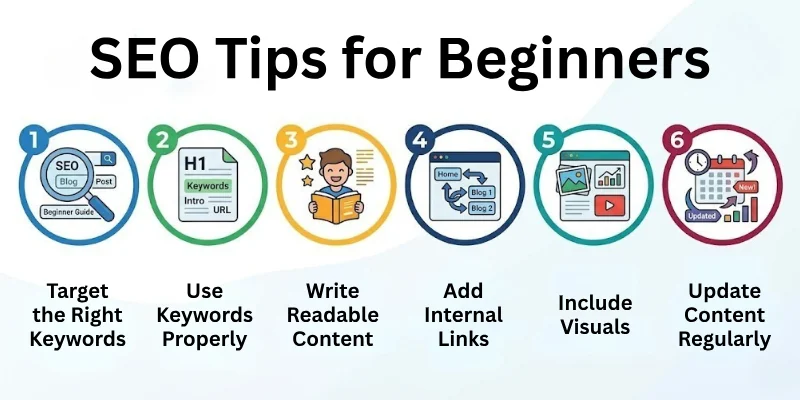
1. Target the Right Keywords
Keywords are the words your audience types in Google when searching for content like yours. Choosing the right ones is the first step to getting found online:
- Research keywords with low competition and good search volume.
- Use tools like Google Keyword Planner, Ubersuggest, or Keyword Surfer.
- Focus on long-tail keywords for targeted traffic.
- Check competitors’ keywords to find gaps in your niche.
2. Use Keywords Properly
Placing keywords in the right areas helps Google understand your content:
- Include keywords in the title, URL, first paragraph, headings, and image alt text.
- Tip: Keep keywords natural; avoid overstuffing.
- Sprinkle keywords in meta descriptions to improve click-through rates.
3. Write Simple and Readable Content
Readable content keeps visitors engaged and helps Google rank your pages higher:
- Write short sentences with simple words.
- Break paragraphs into small chunks.
- Use bullet points, numbered lists, and tables to present information clearly.
- Add examples or mini case studies to make concepts relatable.
4. Add Internal Links
Linking your pages to each other helps Google crawl your website more efficiently and keeps visitors exploring your content:
- Link to related posts or pages whenever relevant.
- Example: If you write about “chocolate cake recipes,” link to your “easy cake frosting guide”.
- Use descriptive anchor text instead of “click here” for better SEO.
5. Include Visuals
Visuals make your content more engaging and help Google understand your topic:
- Add images, charts, infographics, or videos.
- Include descriptive alt text for each visual. recipes”,
- Compress images to improve page loading speed.
6. Update Content Regularly
Fresh content signals Google that your site is active and relevant:
- Update old articles with new information.
- Fix outdated links or statistics.
- Refresh titles, meta descriptions, and headings to improve SEO.
SEO Tips for New Websites
New websites need extra attention to start ranking and getting traffic quickly. By following these simple steps, you can help Google find and index your pages faster:
- Keywords: Focus on low-competition keywords for easier ranking.
- Content: Publish 10–15 helpful articles before expecting significant traffic.
- Sitemap: Submit a sitemap to Google Search Console for faster indexing.
- Links: Avoid orphan pages by linking all new pages internally.
- Social: Create social media profiles to drive initial traffic and awareness.
SEO Tips for Small Businesses
Local SEO helps small businesses get noticed by customers nearby. By optimizing your site and online presence for your location, you can attract more local traffic and build trust:
- Keywords: Use local keywords, e.g., “bakery in Lahore”.
- Profile: Create a Google Business Profile with photos, contact info, and reviews.
- Contact: Add address, phone number, maps, and opening hours on your website.
- Reviews: Encourage customer reviews to build trust and improve local rankings.
- Promotions: Post local events or promotions on your website and social media profiles.
SEO Tips for E-commerce Websites
For online stores, SEO is all about products, categories, and user experience. Optimizing these elements helps your store rank higher, attract buyers, and increase conversions:
- Titles: Optimize product titles and descriptions naturally with relevant keywords.
- Images: Add high-quality images with descriptive alt text for better visibility.
- Reviews: Include customer reviews, ratings, and FAQs to build trust.
- Links: Internal links to related products to guide users through your store.
- Categories: Optimize category pages for broader keywords to improve navigation and ranking.
- Structured Data: Add schema markup for products to show prices, availability, and reviews in search results.
SEO Tips for Bloggers
Bloggers need smart strategies to attract steady traffic and keep readers engaged. By making your content clear, helpful, and relevant, you can grow your audience over time:
- Intent: Match content to search intent; know what readers are looking for.
- Readability: Use subheadings and bullet points for easy scanning.
- Stories: Add storytelling, examples, or mini guides to make content memorable.
- Update: Refresh old posts to keep them relevant and improve rankings.
- Trends: Use Google Trends to discover popular topics in your niche.
- Upgrades: Add content upgrades like PDFs or checklists to grow your email list.
SEO Tips for WordPress Sites
WordPress can make SEO simple when set up correctly. With the right tools and settings, your site can load faster, rank higher, and give visitors a smooth experience:
- Plugins: Use SEO plugins like Yoast SEO or RankMath to optimize your pages.
- Theme: Choose fast, lightweight themes such as Astra or GeneratePress.
- Speed: Compress images and use caching plugins for quicker loading.
- Links: Check and fix broken links regularly to avoid errors.
- URLs: Use clean URLs, e.g., example.com/seo-tips-for-beginners.
- Navigation: Enable breadcrumbs for better navigation and SEO benefits.
SEO Tips for Local Businesses
Want your local business to show up when people search nearby? Local SEO helps your store get noticed and attract nearby customers:
- Keywords: Target “near me” searches, e.g., “coffee shop near me”.
- Location: Add city or area info in headings, meta titles, and descriptions.
- Directories: Join local business directories to increase visibility.
- Reviews: Encourage customer reviews to build trust and improve ranking.
- Maps: Embed Google Maps on your contact page for easy directions and verification.
- Testimonials: Share customer stories to build credibility in your local area.
SEO Tips for Affiliate Websites
Running an affiliate website? Building trust and giving clear guidance can help your visitors take action and boost conversions:
- Reviews: Write honest product reviews, including pros and cons.
- Compare: Add comparison tables to help users decide easily.
- CTA: Use clear calls to action, e.g., “Buy Now” or “Check Price”.
- Keywords: Target relevant product keywords and long-tail phrases.
- Guides: Include how-to guides or demo videos to increase conversions.
SEO Tips to Rank Faster
Want to see your pages climb Google rankings more quickly? By focusing on smart strategies, you can get results faster, attract visitors sooner, and give your website a strong boost in search results.
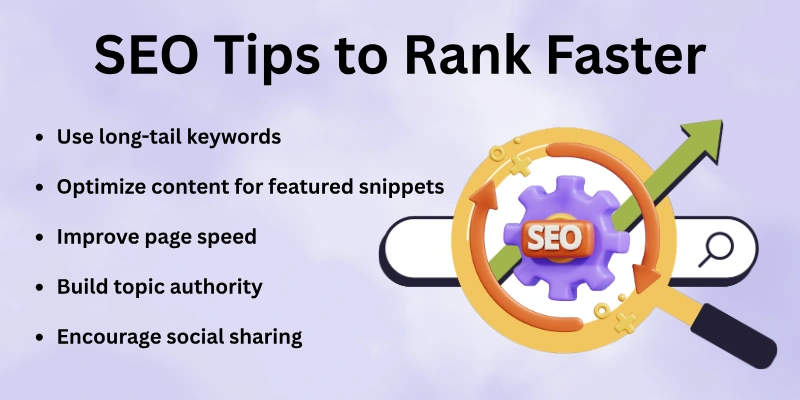
- Keywords: Use long-tail keywords for easier ranking and better conversions.
- Snippets: Optimize content for featured snippets with short, clear answers.
- Speed: Improve page speed to reduce bounce rates and keep visitors engaged.
- Authority: Build topic authority by covering your niche thoroughly.
- Share: Encourage social sharing to increase early traffic signals.
SEO Tips to Increase Traffic
Traffic grows when your content is helpful, shareable, and optimized. Here’s how you can attract more visitors:
- Share: Post your articles on Facebook, LinkedIn, Pinterest, and other platforms to reach more people.
- Email: Build a list and send newsletters to bring visitors back to your website regularly.
- Trends: Create content around popular topics in your niche to stay relevant.
- Links: Add internal and external links to guide readers to related or trusted pages.
- Repurpose: Turn blog posts into videos, infographics, or slides to reach different audiences.
SEO Tips Without Backlinks
You don’t always need backlinks to rank on Google. By focusing on on-page SEO, you can improve your website’s visibility and attract more visitors. Here’s how:
- Optimize headings, keywords, and content structure: Make your content easy to read and help Google understand your main topics.
- Target low-competition keywords: Focus on simple keywords that are easier to rank for and can bring steady traffic.
- Improve user experience (UX) and navigation: Make your website easy to use, fast, and mobile-friendly to keep visitors engaged.
- Write better, more comprehensive content than competitors: Provide clear, helpful, and complete information that answers users’ questions.
- Use question-based content: Answer common questions in your niche to attract search traffic and appear in featured snippets.
Advanced SEO Tips
If you want your website to stand out and get more visitors, it’s time to focus on strategies that show both Google and your audience that your content is trustworthy, useful, and well-organized. These steps can help your pages rank higher and attract more clicks.
- Follow E-E-A-T principles: Show your experience, expertise, authority, and trust so Google sees your content as reliable.
- Add Schema Markup: Use structured data to help Google understand your pages and display rich results like FAQs or ratings.
- Track Performance: Use Google Analytics and Search Console to see which pages perform best and where improvements are needed.
- Optimize Meta Titles and Descriptions: Write clear, engaging titles and descriptions to encourage more clicks from search results.
- Monitor Key Metrics: Keep an eye on CTR, bounce rate, and dwell time to understand what visitors like and adjust your content.
How to Use Analytics to Improve SEO
Analytics tells you how people find and use your website. By understanding this data, you can make smarter SEO decisions and improve your rankings.
- Check which pages get the most visitors and focus on improving them with better content, links, or visuals to keep readers engaged longer.
- Spot keywords that have high impressions but low clicks, and optimize your titles, meta descriptions, and headings to attract more traffic.
- Watch how long visitors stay on each page and make your content easier to read with clear headings, bullet points, and visuals.
- Track your click-through rates (CTR) and rewrite titles and meta descriptions to make them more appealing and clickable.
- Identify slow or mobile-unfriendly pages and improve loading speed, layout, and navigation to enhance user experience.
- Learn from your top-performing pages, analyze why they work, and apply the same style, structure, and keywords to other content.
- Monitor goals like sign-ups, purchases, or downloads and prioritize optimizing pages that deliver the best results for your website.
Final Note
In this article, we have explained SEO tips simply and practically so beginners can understand them easily. We covered keyword research, content optimization, on-page SEO, local SEO, using analytics, and FAQs.
Each section included steps that work for blogs, business websites, e-commerce stores, and new sites. SEO is not an overnight process, but if you follow these tips consistently, your Google rankings and website traffic will improve over time.
Start with small steps, focus on quality, and give your results time to grow.
FAQs: Search Engine Optimization Tips
Curious how SEO can help your site succeed? These FAQs explain the key points in a simple way, so you can start applying them right away.
SEO tips are simple steps that help a website rank higher on Google. They improve visibility and bring more visitors. SEO tips focus on content quality, keyword use, and page structure. Beginners can follow these tips without technical skills.
SEO tips are important because they help websites grow online by:
- Improving search engine visibility
- Bringing free and long-term traffic
- Helping users find content easily
- Building trust with search engines
To rank your landing pages higher, focus on clear headings, relevant keywords, and concise content. Add a strong meta title and description, use engaging visuals with alt text, include internal links, and ensure fast loading speed. A well-structured landing page improves user experience and boosts Google rankings.
Yes, SEO tips are very useful for beginners. They are easy to understand and simple to apply. You do not need coding skills. By following basic SEO tips, beginners can slowly improve rankings and traffic.
SEO tips usually take 4 to 12 weeks to show results. The time depends on competition, content quality, and website age. Regular updates help improve results faster. SEO works best with patience.
Yes, SEO tips can work without backlinks if you focus on:
- On-page SEO improvements
- Low-competition keywords
- Helpful and clear content
- Better user experience
Startups can improve visibility by focusing on simple and effective SEO strategies. Use low-competition keywords, optimize your website’s content and headings, create quality blog posts, set up a Google Business Profile if local, and track performance with Google Analytics. These steps help your startup rank higher on Google and attract early visitors.
New websites should start with simple SEO tips. Focus on low-competition keywords and publish helpful content regularly. Submit your site to Google Search Console. Internal linking also helps Google find your pages faster.
Yes, SEO tips increase website traffic naturally by:
- Attracting users searching for your topic
- Improving click-through rates
- Helping content rank for multiple keywords
- Bringing long-term organic visitors
Yes, you can do SEO yourself. Many SEO tips are beginner-friendly and free to apply. With time and consistency, anyone can learn SEO. Start small and improve step by step.



- Be Respectful
- Stay Relevant
- Stay Positive
- True Feedback
- Encourage Discussion
- Avoid Spamming
- No Fake News
- Don't Copy-Paste
- No Personal Attacks
- Be Respectful
- Stay Relevant
- Stay Positive
- True Feedback
- Encourage Discussion
- Avoid Spamming
- No Fake News
- Don't Copy-Paste
- No Personal Attacks
