SEO for Doctors – Get More Appointments Every Month
Published: 30 Apr 2026
These days, most patients search online before booking an appointment. Google is the first place people check when they need a dentist, dermatologist, or pediatrician. If your clinic does not appear in search results, you could lose many potential patients every month.
That’s why SEO (Search Engine Optimization) is so important for doctors. SEO helps your website rank higher in Google, making it easier for the right patients to find you. It also builds trust and helps you stand out in the busy healthcare field.
In this guide, we will explain everything about SEO for doctors, step by step, so your practice can grow online.
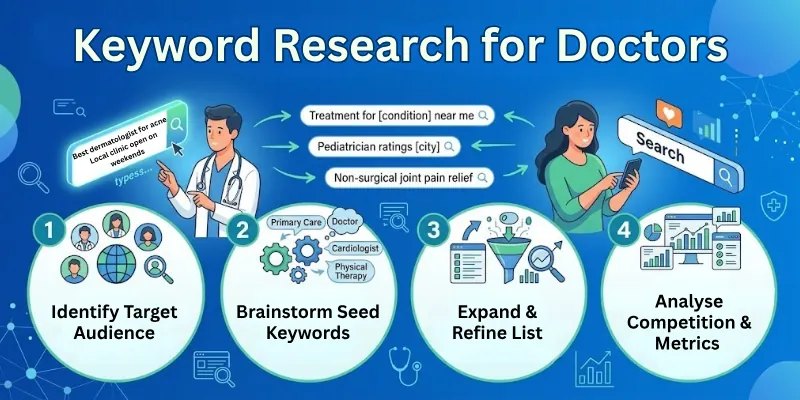
Step 1: Keyword Research for Doctors
Keywords are the words or phrases people type on Google to find doctors. Using the right keywords is the first step in SEO.
How to Find Keywords
- Use tools like Google Keyword Planner, SEMrush, or Ahrefs
- Think like a patient: what would they type if they needed your service?
Short-Tail vs Long-Tail Keywords
- Short-Tail: “Dentist,” “Cardiologist” – very competitive and general
- Long-Tail: “Best pediatric dentist in Dallas” – specific and easier to rank
Add Local Keywords
Patients search with location. Example:
- “Family doctor in Brooklyn”
- “Orthopedic surgeon near me”
Using local keywords increases your chances of appearing in searches near your clinic.
Step 2: On-Page SEO for Doctors
On-page SEO means optimizing the content and elements on your website so patients and Google can understand it easily.
Write Clear and Simple Content
Good content helps patients read and understand your services quickly.
- Use plain words and short sentences.
- Avoid complicated medical terms.
- Explain treatments in a way anyone can understand.
Example: Instead of saying “Pediatric endodontics”, say “Dental treatment for children’s teeth.”
Meta Titles and Descriptions
Titles and descriptions appear in Google search results and tell patients what your page is about.
- Include keywords patients use when searching.
- Make each title and description unique for every page.
Example:
- Title: “Best Pediatric Dentist in Dallas – Dr. Smith”
- Description: Dr. Smith provides gentle and professional dental care for children in Dallas. Book your appointment online today!
Use Header Tags
Headers make your content organized, easier to read and help Google understand your page.
- H1: Main page title
- H2: Section titles
- H3: Subsection titles
Tip: Use headers to separate topics so patients can quickly find what they need.
Optimize Images and Videos
Images and videos make your website more engaging and improve SEO.
- Add descriptive alt text for images (e.g., “child smiling after dental treatment”).
- Compress images to make your website faster.
- Include short videos to explain treatments or share simple health tips.
Step 3: Technical Search Engine Optimization for Doctors
Technical SEO ensures your website works perfectly for patients and is easy for Google to read. A technically strong site improves user experience, keeps visitors on your pages longer, and boosts your rankings in search results.
Mobile-Friendly Website
Most patients now search using smartphones or tablets. If your website isn’t mobile-friendly, it may look messy or be hard to navigate.
- Make sure your site adjusts to all screen sizes.
- Use large buttons and readable text.
- Keep forms simple so patients can book appointments easily.
Tip: Test your website on different devices to ensure it looks professional everywhere.
Fast Loading Speed
Patients leave websites that take too long to load. A fast website keeps visitors engaged and improves your position in Google search results.
- Choose reliable and fast hosting.
- Compress images without losing quality.
- Remove unnecessary plugins or code that slows your site down.
Tip: A website that loads in under 3 seconds keeps most visitors on your pages.
Secure HTTPS Website
HTTPS protects your patients’ personal information and shows Google your website is trustworthy.
- Ensure all pages use HTTPS, not HTTP.
- Display a secure lock icon in the browser to build trust with visitors.
Tip: Patients feel more confident booking appointments on secure websites.
Schema Markup
Schema is a type of code that helps Google understand your website content better and display useful information directly in search results.
Use schema for:
- Services offered
- Patient reviews
- Appointment links
Benefit: Google can show star ratings, contact details, and “Book Appointment” buttons right in the search results. This makes your clinic look professional, credible, and easy to reach.
Step 4: Local SEO for Doctors
Local SEO helps patients in your area find your clinic easily. Optimizing for local search increases appointments and builds trust in your community.
Google Business Profile
Your Google Business Profile is the first thing patients see when searching for local doctors.
Claim your profile and complete all details:
- Clinic name
- Address and phone number
- Business hours
- Services and photos
Keep your information accurate so patients can reach you easily.
Online Directories
Listing your clinic on popular directories boosts your online presence and credibility.
Add your clinic to:
- Healthgrades
- Zocdoc
- Yelp
- Local business directories
Make sure your Name, Address, and Phone number (NAP) are the same everywhere to avoid confusion.
Encourage Patient Reviews
Reviews increase trust and help your clinic appear higher in search results.
- Ask happy patients to leave reviews after visits.
- Respond politely to all reviews, even the negative ones.
- Positive reviews improve visibility and make new patients feel confident choosing your clinic.
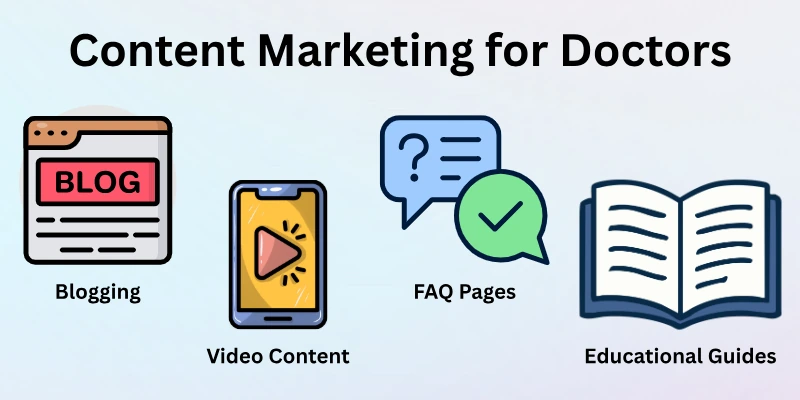
Step 5: Content Marketing for Doctors
Content marketing helps patients learn about your services and builds trust. Good content also improves your website’s SEO and keeps visitors engaged.
Blogging
Write simple articles that answer patients’ questions or give helpful tips. Topics can include common health problems, treatments, or prevention tips.
Examples:
- “5 Tips to Keep Your Child’s Teeth Healthy”
- “How to Prevent Back Pain at Home”
- Use easy words and short sentences so everyone can understand.
Video Content
Short videos help explain treatments and make your website more engaging.
- Videos can show procedures, explain health tips, or share patient success stories.
- Videos also increase the time patients spend on your site, which helps SEO.
FAQ Pages
FAQ pages answer common patient questions and improve your search rankings. Examples of questions:
- “What insurance do you accept?”
- “How do I prepare for a check-up?”
FAQs help patients find answers quickly and make your website more useful.
Educational Guides or Resources
Offer downloadable guides, checklists, or health tips.
- Example: “Guide to a Healthy Pregnancy” or “Checklist for Kids’ First Dental Visit”.
- These resources show patients you care and encourage them to book an appointment.
Step 6: Link Building for Doctors
Link building helps your website gain authority in Google’s eyes. When trustworthy websites link to your clinic, it shows Google that your site is reliable.
Guest Posts
Write articles for other medical blogs or local health websites.
- Include links back to your website.
- Example: Write a blog about “Tips for Healthy Teeth in Children” and include a link to your dental clinic page.
- Benefit: This drives traffic to your website and improves SEO.
Local Backlinks
Links from local organizations and websites boost your clinic’s credibility in your area. Reach out to:
- Community websites
- Hospitals
- Local news sites
Example: Ask a local hospital website to link to your “Children’s Health Guide” page.
Partner and Sponsorship Links
Collaborate with local businesses, charities, or health events.
- Sponsor a community health event or write about it on your website.
- Ask the event’s website to link back to your clinic page.
- Benefit: Builds trust and brings local patients to your clinic.
Avoid Low-Quality Links
Not all links are helpful.
- Avoid spammy or unrelated websites.
- Focus on trusted medical or local websites.
- Quality links matter more than quantity.
Step 7: Social Media and SEO
Social media helps you reach more patients and drives traffic to your website. Engaging content on social platforms also improves your clinic’s online visibility.
Share Your Content
- Use Facebook, Instagram, LinkedIn, or TikTok, depending on your audience.
- Example: Share a short video about “Tips for Healthy Teeth in Children” and link to your website.
- Benefit: More people visit your website and learn about your services.
Interact With Patients
- Reply to comments and messages politely.
- Answer health questions in a simple, friendly way.
- Example: A parent asks about vaccination schedules—respond with a short, easy-to-understand answer.
Promote Reviews and Success Stories
- Share testimonials or before-and-after treatment stories (with permission).
- Encourage patients to leave reviews on Google and social media.
- Benefit: Positive stories increase credibility and attract new patients.
Track Social Media Performance
- Track likes, comments, shares, and clicks to your website.
- Focus on content that gets the most engagement.
- Adjust your posts based on what patients respond to.
Step 8: Track and Measure SEO Success
Tracking your SEO helps you know what’s working and what needs improvement. By measuring results, you can make smart decisions to grow your clinic online.
Use Analytics Tools
- Google Analytics: Shows how many visitors come, which pages they view, and how long they stay.
- Google Search Console: Tells you which keywords bring patients to your site and if there are technical issues.
- SEMrush or Ahrefs: Helps track your keyword rankings and competitors.
Monitor Key Metrics
- Organic traffic growth: More visitors from Google means better SEO.
- Keyword rankings: Check if your website appears for important search terms.
- Appointment requests: Track how many patients book through your website.
- Bounce rate: A lower bounce rate means visitors stay longer on your site.
Review and Improve Regularly
- Check metrics monthly and note improvements or drops.
- Update outdated content and fix technical issues.
- Adjust your SEO strategies for doctors based on what works best.
Celebrate Small Wins
- Ranking higher for a local keyword.
- Getting more positive patient reviews online.
- Increasing website visitors or appointment requests.
Tip: Track your progress step by step—small, consistent efforts lead to long-term success.
Common SEO Mistakes Doctors Should Avoid
Even small mistakes can hurt your website’s visibility and make it harder for patients to find you. Avoiding these common SEO errors will help your clinic rank higher and attract more patients.
By focusing on the right strategies and staying consistent, you can build a strong online presence without setbacks.
Mistakes to Watch Out For:
- Not using local SEO: Ignoring local search means nearby patients may never find your clinic.
- Overusing keywords (keyword stuffing): Adding too many keywords makes your content hard to read and can hurt your rankings.
- Slow or unresponsive website: A slow site or one that doesn’t work on mobile devices will lose visitors quickly.
- Ignoring patient reviews: Reviews impact trust and search rankings—ignoring them can reduce visibility.
- Copying content from other websites: Duplicate content can lower your rankings and damage credibility.
Wrapping Up
So guys, it’s time to wrap up. In this article, we’ve covered SEO for doctors in detail. From keyword research to on-page SEO, technical SEO, local SEO, content marketing, and link building—you now have a full roadmap to grow your practice online.
Start with small steps:
- Optimize your website
- Claim your Google Business Profile
- Create simple blogs or FAQs
SEO takes time, but consistent effort will bring more patients, improve your online reputation, and grow your clinic for years.
Please don’t forget to leave a review.
FAQs: SEO for Doctors
Doctors often wonder how SEO can bring more patients to their clinic. This FAQ answers the most common questions in a clear, easy-to-follow way:
SEO for doctors means improving your website, so Google shows it to patients when they search online. It helps more people find your clinic, book appointments, and trust your services.
SEO does not show results overnight. Most practices start seeing improvements in 3–6 months with consistent work like updating content, optimizing listings, and tracking performance.
Local SEO means optimizing your profile so patients in your area see your clinic first. This includes your Google Business Profile, address, hours, photos, and patient reviews. It helps you appear in local search results and on Google Maps.
Reviews:
- Better reviews help your clinic rank higher.
- More positive reviews build trust with new patients.
- Replying politely to reviews shows professionalism and care.
Good content answers real patient questions and uses words they search for. Include simple service pages, helpful blog posts, FAQ sections, and clear contact information.
Yes, doctors can start SEO with basic steps like writing helpful articles, claiming their Google Business Profile, and adding location words to their website. But many choose to support speeding up results.
SEO vs Paid Ads:
- SEO brings organic traffic over time and keeps working without ongoing cost.
- Paid ads bring quick attention but stop working when you stop paying. SEO for medical clinics builds long-term visibility and trust.




- Be Respectful
- Stay Relevant
- Stay Positive
- True Feedback
- Encourage Discussion
- Avoid Spamming
- No Fake News
- Don't Copy-Paste
- No Personal Attacks
- Be Respectful
- Stay Relevant
- Stay Positive
- True Feedback
- Encourage Discussion
- Avoid Spamming
- No Fake News
- Don't Copy-Paste
- No Personal Attacks
