Main Advantages and Disadvantages of Online Surveys in 2026
Published: 25 Apr 2026
Have you ever wondered why online surveys are so popular, yet sometimes fail to give accurate results?
The advantages and disadvantages of online surveys help clear this confusion by showing both sides of this method.
Online surveys make it easy to collect data quickly from many people, but they also come with issues like fake responses and limited personal interaction. Many users find it confusing whether they should fully trust online survey results or not.
That is why understanding both benefits and drawbacks is very important before using them in real research or business decisions.
Benefits of online surveys
Online surveys offer many useful benefits for businesses, students, and researchers. They make data collection simple, fast, and affordable.
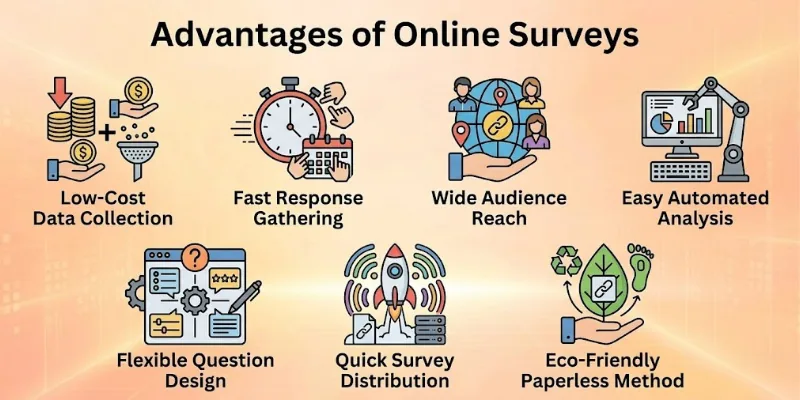
Here is the list of pros of online surveys:
- Low-Cost Data Collection
- Fast Response Gathering
- Wide Audience Reach
- Easy Automated Analysis
- Flexible Question Design
- Quick Survey Distribution
- Eco-Friendly Paperless Method
Let’s analyse the advantages of online surveys in detail.
1. Low-Cost Data Collection
Online surveys help you collect data without spending much money. You do not need paper, printing, or travel costs. This makes it a smart choice for small businesses and students. You can start a survey with very little budget.
Many free tools, like Google Forms, also support online surveys. Even large companies use them to save research costs. It also reduces the need for staff to collect answers manually. This saves both time and money in daily work.
Smart Cost Tips
- Use free survey tools first
- Avoid paid ads for small surveys
- Share surveys through email or social media
- Reuse survey templates
- Set a clear budget before starting
2. Fast Response Gathering
Online surveys collect answers very quickly. You can send a link and get responses within minutes or hours. This helps when you need fast feedback for decisions. It works much faster than paper surveys.
People can answer surveys anytime from their phone or laptop. This increases the speed of response collection. Businesses often use it during product launches or events. They get quick feedback to improve their service.
Smart Speed Tips
- Share surveys at peak online hours
- Use short and simple questions
- Send reminders for faster replies
- Keep survey length small
- Use mobile-friendly formats
3. Wide Audience Reach
Online surveys help you reach people from different cities and countries. You are not limited to one location. This makes your data more diverse and useful. It is helpful for global research projects.
You can easily share surveys on social media, email, or websites. Many people can join without any physical meeting. This helps businesses understand different customer groups. It also improves decision-making with better data coverage.
Smart Reach Tips
- Share on multiple platforms
- Target different age groups
- Use social media groups
- Send to email lists
- Add simple sharing buttons
4. Easy Automated Analysis
Online surveys automatically collect and organize answers. You do not need to enter data manually. This reduces human errors in results. It also makes the process smooth and simple.
Most tools show charts and summaries instantly. You can quickly understand patterns in answers. This helps in faster decision-making. Even beginners can read results without technical skills.
Smart Analysis Tips
- Use built-in charts for clarity
- Export data for deeper study
- Focus on key trends only
- Avoid too many question types
- Review results regularly
5. Flexible Question Design
Online surveys allow many types of questions. You can use multiple-choice, rating scales, or open-ended answers. This makes surveys more useful and clear. You can change questions anytime before sharing.
This flexibility helps match different research needs. You can keep surveys simple or detailed based on your goal. It also improves user experience. People find it easier to answer well-designed surveys.
Smart Design Tips
- Keep questions short and clear
- Mix question types wisely
- Avoid confusing language
- Test survey before launch
- Focus on one topic per section
6. Quick Survey Distribution
Online surveys are easy to share with many people at once. You can send a link through email or social media. This saves a lot of time compared to printed surveys. It also removes physical delivery work.
One link can reach thousands of users instantly. This makes distribution very efficient. Businesses often use it during campaigns or feedback drives. It helps collect large data in less time.
Smart Distribution Tips
- Share links on multiple channels
- Use QR codes for quick access
- Pin surveys on websites
- Send reminders regularly
- Keep sharing messages short
7. Eco-Friendly Paperless Method
Online surveys reduce paper use completely. This helps protect trees and the environment. It also reduces waste from printing and transport. Many organizations prefer it for green practices.
Digital surveys support sustainability goals. They reduce the carbon footprint from physical processes. Even schools and companies use them to go eco-friendly. It is a simple step toward a cleaner planet.
Smart Eco Tips
- Avoid printed surveys completely
- Use digital sharing only
- Encourage online participation
- Reduce unnecessary attachments
- Promote green survey habits
Limitations of Online Surveys
Online surveys also come with some limits that can affect the quality of results.
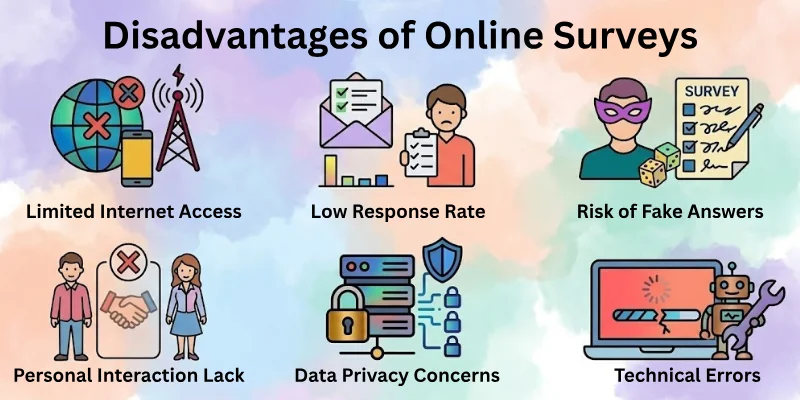
It is important to understand these challenges before using them for research.
- Limited Internet Access
- Low Response Rate
- Risk of Fake or Random Answers
- Lack of Personal Interaction
- Data Privacy Concerns
- Technical Errors and Glitches
Let’s cover the limitations of surveys in detail.
1. Limited Internet Access
Online surveys depend on an internet connection. Many people cannot join if they have weak or no internet. This creates a gap in data collection. Some groups may get fully left out.
This problem is common in rural areas or places with low connectivity. It reduces the overall reach of your survey. As a result, the data may not fully represent all users. This can affect research accuracy.
Smart Fix Tips
- Share surveys in offline-supported areas too
- Use mobile-friendly surveys
- Keep survey size light
- Offer SMS-based options if possible
- Avoid heavy images or files
2. Low Response Rate
Many people ignore survey links. They may see it, but do not open it. This leads to fewer responses than expected. It can slow down your research process.
People often feel busy or uninterested in surveys. Some also forget to complete them later. This creates incomplete data sets. Businesses may struggle to get enough feedback.
Smart Fix Tips
- Keep surveys short and simple
- Add a clear purpose message
- Send reminder messages
- Offer small rewards
- Use engaging titles
3. Risk of Fake or Random Answers
Some users do not answer honestly. They may click random options just to finish quickly. This reduces the quality of data. It can lead to wrong results.
This issue often happens in long or boring surveys. Some people do not take it seriously. Fake answers can affect business decisions. It makes research less reliable.
Smart Fix Tips
- Use simple and engaging questions
- Add attention-check questions
- Avoid very long surveys
- Explain the importance clearly
- Monitor response patterns
4. Lack of Personal Interaction
Online surveys do not allow face-to-face contact. You cannot see emotions or reactions. This reduces deeper understanding of answers. It feels less personal.
Sometimes people give short or unclear answers. You cannot ask follow-up questions easily. This limits detailed feedback. It is not suitable for deep interviews.
Smart Fix Tips
- Add open-ended questions
- Use clear instructions
- Combine with interviews if needed
- Keep questions easy to understand
- Provide examples in questions
5. Data Privacy Concerns
People worry about how their data is used. They may not trust online forms easily. This can affect their willingness to respond. Privacy becomes a big concern.
If data is not protected, it can be misused. This can damage trust between users and researchers. It is very important to handle data carefully. Security issues reduce participation.
Smart Fix Tips
- Use trusted survey platforms
- Add privacy statement
- Avoid asking sensitive details
- Secure data storage
- Be transparent with users
6. Technical Errors and Glitches
Online surveys can face system issues. Pages may not load properly or crash. This stops users from completing surveys. It affects data collection.
Some users may also face device compatibility problems. Older phones or browsers may not support surveys well. This creates frustration. It reduces response quality.
Smart Fix Tips
- Test survey before sharing
- Keep design simple
- Avoid heavy media files
- Use reliable platforms
- Check mobile compatibility
Comparison Table: Online Surveys vs Offline Surveys
Here is a simple comparison to help you understand both methods clearly:
| Feature | Online Surveys | Offline Surveys |
| Cost | Low cost and budget-friendly | High cost due to printing and travel |
| Speed | Very fast response collection | The slow process takes more time |
| Reach | Global audience access | Limited to a specific location |
| Data Collection | Automatic and digital | Manual entry needed |
| Accuracy | Can include fake or careless answers | More controlled and supervised answers |
| Interaction | No direct human contact | Face-to-face communication possible |
| Flexibility | Easy to edit and update | Hard to change after printing |
| Environment Impact | Paperless and eco-friendly | Uses paper and creates waste |
| Response Rate | Often low without reminders | Usually higher with direct contact |
| Technical Needs | Requires internet and devices | No internet needed |
When Should You Use Online Surveys?
Online surveys work best when you need quick, simple, and large-scale feedback. They help you reach many people in a short time without spending much money or effort.
You can use them in different situations where fast and easy data collection matters.
- When you need fast feedback from users or customers
- When you want to collect data from a large audience
- When your budget is limited for research work
- When you want results without manual data entry
- When you need to reach people in different locations
- When you are running online marketing or product testing
- When you want simple opinions or satisfaction feedback
Common Mistakes in Online Surveys
Online surveys are easy to create, but small mistakes can reduce the quality of the results. Many people make simple errors that affect responses and data accuracy. It is important to avoid these issues for better and more reliable feedback.
- Asking too many questions in one survey
- Using confusing or unclear language
- Not targeting the right audience
- Ignoring mobile users and design issues
- Making the survey too long and boring
- Not testing the survey before sharing
- Forgetting to add clear instructions for users
Conclusion
In this article, we have discussed the advantages and disadvantages of online surveys in a simple and clear way. We explored how online surveys help in fast data collection, low-cost research, and wide audience reach. We also looked at their limits, such as low response rate, privacy concerns, and technical issues.
Online surveys are very useful when used in the right way. They save time and make research easy, but they also need careful planning to get accurate results.
Before you leave, don’t skip the next part of the FAQs. It has more helpful answers about online surveys advantages and disadvantages. You may find something new and useful there, so don’t miss it, or you might lose important insights.
FAQs on Advantages and Disadvantages of Online Surveys
Here are some common questions people ask about the strengths and weaknesses of online surveys. These answers will help you understand the topic simply and clearly:
Online surveys are digital tools used to collect data, feedback, and opinions from users. Businesses use them in online survey research to understand customer needs and behaviour.
They help in making better decisions with real user input.
Online surveys help businesses collect feedback quickly and at low cost. They also support large-scale data collection from different locations.
This makes them very useful in the advantages of online surveys for business.
Online surveys also have some limits that affect results. Many users may give fake answers or ignore questions. These issues are part of the disadvantages of online surveys in research.
Online surveys can be reliable if they are well-designed. Poor questions or random answers can reduce accuracy.
That is why online survey reliability in research depends on proper planning.
You can increase responses by keeping surveys short and simple. Clear instructions and reminders also improve participation. Small rewards can boost engagement in online survey response rate improvement.
Many tools help create and manage surveys easily. These tools are widely used for online survey creation and analysis.
Popular online survey tools include:
- Google Forms
- SurveyMonkey
- Typeform
- Microsoft Forms
Online surveys should be used when fast and large-scale feedback is needed. They are ideal for product feedback, market research, and customer insights. This makes them important in online surveys for market research and business growth.




- Be Respectful
- Stay Relevant
- Stay Positive
- True Feedback
- Encourage Discussion
- Avoid Spamming
- No Fake News
- Don't Copy-Paste
- No Personal Attacks
- Be Respectful
- Stay Relevant
- Stay Positive
- True Feedback
- Encourage Discussion
- Avoid Spamming
- No Fake News
- Don't Copy-Paste
- No Personal Attacks
