Top Advantages and Disadvantages of CRM Systems in 2026
Published: 14 Apr 2026
Managing customer information can feel overwhelming, especially when your business grows. A CRM can organize contacts, track leads, and help your team work more efficiently. Yet, it may also bring challenges like training needs, costs, and technical problems.
Understanding the advantages and disadvantages of CRM helps you avoid common mistakes and get the most from your system.
Let’s dig in to explore the pros and cons of CRM in detail.
Advantages of CRM
CRM systems can make running a business much easier. They help companies manage customers, improve sales, and provide better service. However, CRM works best when teams use it correctly.
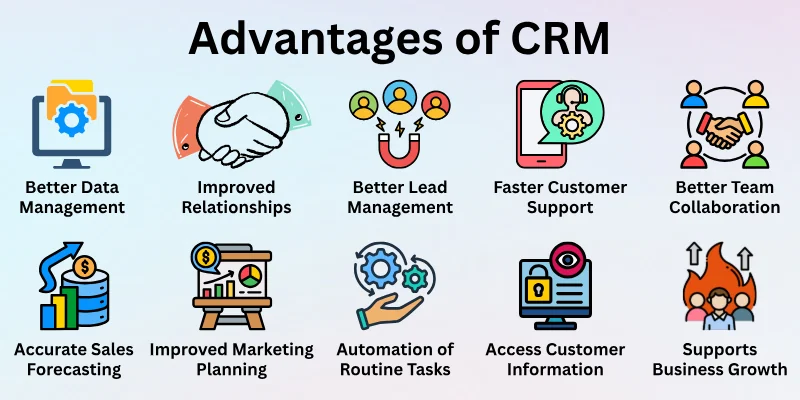
Here are the main advantages that show why many businesses rely on CRM:
- Better Customer Data Management
- Improved Customer Relationships
- Better Lead Management
- Faster Customer Support
- Better Team Collaboration
- Accurate Sales Forecasting
- Improved Marketing Planning
- Automation of Routine Tasks
- Easy Access to Customer Information
- Supports Business Growth
Let’s analyze them all the benefits of CRM in detail.
1. Better Customer Data Management
CRM helps businesses keep customer information in one system. Teams can store contact details, purchase history, and messages in the same place. Employees can quickly open a customer profile and view the needed data. This saves time and reduces confusion. Businesses manage customer records in a simple and organized way.
Key Benefits
- Central location for storing customer records
- Real-time updates keep information current
- Less dependence on paperwork and spreadsheets
- Secure storage for important customer details
- Clear history of customer interactions
2. Improved Customer Relationships
CRM allows businesses to understand their customers better. Teams can review past conversations and buying habits. This information makes communication more personal. Customers feel valued when companies remember their needs. Strong relationships increase customer loyalty.
Key Benefits
- Personalized communication with customers
- Better understanding of customer preferences
- Stronger trust between the business and its clients
- Higher chances of repeat purchases
- More meaningful customer engagement
3. Better Lead Management
CRM systems organize potential customer information. Sales teams track leads from the first contact until the final sale. The system shows which prospects need follow-ups. This structure keeps the sales process organized. Businesses focus on the best opportunities.
Key Benefits
- Organized lead tracking process
- Clear visibility of sales opportunities
- Scheduled reminders for follow-ups
- Reduced the chance of losing potential clients
- Structured sales pipeline management
4. Faster Customer Support
CRM tools give support teams quick access to customer details. Agents can check past orders and previous problems before responding. This information speeds up the support process. Customers receive faster and more accurate solutions. Good service improves customer satisfaction.
Key Benefits
- Quick view of customer service history
- Faster response to customer questions
- Simple tracking of service requests
- Better understanding of recurring problems
- Improved overall support quality
5. Better Team Collaboration
CRM systems allow different departments to share information. Sales, marketing, and support teams use the same customer data. Everyone works with updated information. This improves communication between teams. Businesses operate more smoothly.
Key Benefits
- Shared customer database for all departments
- Clear communication between teams
- Consistent information across the company
- Reduced misunderstandings in workflow
- Coordinated efforts toward common goals
6. Accurate Sales Forecasting
CRM systems collect data from sales activities. Managers analyze this data to estimate future revenue. Sales forecasts help businesses plan resources. Companies prepare for upcoming opportunities and challenges. Better planning leads to smarter decisions.
Key Benefits
- Clear view of sales performance trends
- Data-based predictions for future revenue
- Better planning for inventory and resources
- Improved sales goal setting
- Stronger business strategy planning
7. Improved Marketing Planning
CRM provides useful customer insights for marketing teams. Businesses learn about customer interests and behaviour. This knowledge improves marketing campaigns. Companies can send relevant offers and messages. Marketing becomes more focused and effective.
Key Benefits
- Customer segmentation for targeted campaigns
- Deeper understanding of customer interests
- More relevant promotional messages
- Better timing for marketing campaigns
- Higher engagement with marketing content
8. Automation of Routine Tasks
CRM systems reduce repetitive work. Automatic reminders, email scheduling, and data updates happen within the system. Employees spend less time on manual tasks. Work becomes faster and more efficient. Teams focus on activities that bring more value.
Key Benefits
- Automatic task reminders for employees
- Scheduled follow-up emails for customers
- Reduced manual record updates
- Streamlined daily work processes
- Increased productivity across teams
9. Easy Access to Customer Information
Many CRM tools work through cloud systems. Employees can open the platform from different devices. Customer information stays available even when teams work remotely. This flexibility supports modern work environments. Businesses stay connected to their customers anytime.
Key Benefits
- Access to data from laptops and mobile devices
- Convenient support for remote teams
- Instant viewing of customer profiles
- Flexible working conditions for employees
- Continuous access to business information
10. Supports Business Growth
CRM systems help companies manage larger customer bases. As businesses grow, customer interactions also increase. CRM keeps these interactions organized. Companies maintain quality service even with many customers. This structure supports long-term expansion.
Key Benefits
- Organized management of large customer databases
- Smooth handling of increasing customer requests
- Strong foundation for business expansion
- Consistent service during company growth
- Scalable system for growing operations
Disadvantages of CRM
Even though CRM systems help businesses a lot, they also have some challenges. Not every CRM system is perfect, and companies may face problems like high costs, technical issues, or employee resistance.
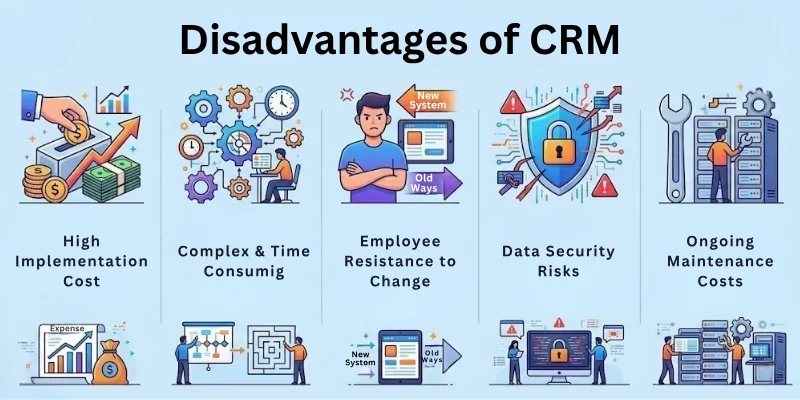
Here are the main disadvantages to know before using a CRM:
- High Implementation Cost
- Employee Training Requirements
- Data Security Risks
- Complex System Setup
- Integration Challenges
- Dependence on Technology
- Poor Data Quality Problems
- Employee Resistance to Change
- Ongoing Maintenance Costs
- Risk of Over-Automation
Let’s cover all these drawbacks of CRM in detail.
1. High Implementation Cost
CRM systems can be expensive to buy and set up. Companies need to pay for software, installation, and sometimes customization. Small businesses may find the initial investment difficult. The cost can delay adopting a CRM system. Planning the budget carefully is important.
Key Problems
- Subscription or licensing fees can be high
- Setup and installation expenses add up
- Customization increases initial costs
- Small companies may struggle financially
- Additional expenses for system updates
2. Employee Training Requirements
CRM systems require proper training for employees. Staff must learn how to use all features correctly. Without training, the system can be confusing. Training also takes time and resources. Businesses must invest in preparing their teams.
Key Problems
- Employees need time to learn the system
- Training programs increase company expenses
- Some staff may find the software difficult
- Learning new workflows slows work initially
- Ongoing support is often needed
3. Data Security Risks
CRM stores large amounts of customer information. If security is weak, hackers may access it. Data breaches can harm the company’s reputation. Businesses must protect sensitive information carefully. Strong security measures are required.
Key Problems
- Risk of unauthorized access to customer data
- Possible leaks or hacking incidents
- Need for strong cybersecurity protocols
- Breaches can reduce customer trust
- Potential legal consequences for poor protection
4. Complex System Setup
Setting up a CRM system can be complicated. Businesses must configure the system to match their needs. Poor setup can create problems later. Technical support may be required. Proper planning is essential for a smooth setup.
Key Problems
- Technical configuration can be difficult
- Setup may require expert assistance
- Mistakes during setup affect performance
- Implementation can take a long time
- Planning is needed to avoid future issues
5. Integration Challenges
CRM systems need to work with other tools like email, accounting, and marketing software. Sometimes, connecting systems is not easy. Integration problems can slow business processes. Technical adjustments may be required for smooth operation.
Key Problems
- Compatibility issues with existing software
- Difficult or slow system connections
- Extra development work may be needed
- Risk of data transfer errors
- Additional integration costs
6. Dependence on Technology
CRM systems rely heavily on technology. If the system fails, operations may slow down. Technical problems can interrupt daily tasks. Businesses must have stable systems and internet connections. Reliability is important for productivity.
Key Problems
- System downtime affects operations
- Internet issues limit access to CRM
- Technical failures can delay work
- Businesses depend on software performance
- Continuous technical maintenance is required
7. Poor Data Quality Problems
CRM systems work best with accurate data. Incorrect or outdated information makes the system unreliable. Poor data can lead to wrong business decisions. Businesses must regularly check and clean data to maintain quality.
Key Problems
- Mistakes in data entry cause errors
- Outdated information reduces system value
- Duplicate records may appear
- Poor data affects reporting and decisions
- Regular data cleaning is required
8. Employee Resistance to Change
Some employees do not like using new systems. They may prefer older methods. This resistance can slow down CRM adoption. Companies need to support employees during the transition. Encouragement and training help overcome this challenge.
Key Problems
- Employees may avoid using CRM
- Resistance slows system adoption
- Staff may feel uncomfortable with new tools
- Managers must motivate teams to adapt
- Change management is often required
9. Ongoing Maintenance Costs
CRM systems require updates, technical support, and maintenance. These costs continue after setup. Businesses need to plan for long-term expenses. Maintenance is essential to keep the system working efficiently.
Key Problems
- Regular software updates cost money
- Need for technical support services
- Continuous monitoring adds expenses
- Maintenance costs grow over time
- Budget planning is necessary for long-term use
10. Risk of Over-Automation
CRM systems often automate tasks like emails and follow-ups. Too much automation can make customer interactions feel impersonal. Personal relationships may weaken if companies rely only on automated messages. A balance between automation and human interaction is important.
Key Problems
- Automated communication may seem robotic
- Customers may prefer human interaction
- Overuse of automation can harm relationships
- Less personal touch in customer service
- Monitoring is required to keep interactions natural
Tips Before Choosing a CRM System
Choosing the right CRM system can be tricky. Picking the wrong one may cost money, time, and frustration. These tips will help you make a smart decision and get the most out of your CRM.
Key Tips
- Define your business goals: Know what you want the CRM to achieve
- Choose simple and user-friendly software: Avoid overly complex systems
- Check for integration: Make sure it works with your email, marketing, or accounting tools
- Train your team properly: Ensure everyone knows how to use the system
- Keep customer data accurate: Regularly update and clean records
- Start small, then expand: Begin with essential features before adding advanced tools
- Consider budget and long-term costs: Factor in setup, subscription, and maintenance expenses
Final Words
In this guide, we have covered the advantages and disadvantages of CRM. While CRM systems offer many benefits like better customer management, increased sales, and improved teamwork, they also come with limitations such as costs, technical challenges, and training requirements.
My recommendation is to balance these risks by choosing the right CRM for your business size, providing proper training to your team, and regularly maintaining your system. By doing this, you can enjoy the benefits while minimizing potential issues.
Thank you for reading this guide carefully, and I hope it helps you make a smart choice for your business.
FAQs: Advantages and Disadvantages of CRM
Check out these common questions about the benefits and drawbacks of CRM to learn the key points quickly:
CRM tracks leads, customer interactions, and follow-ups. Sales teams can prioritize important opportunities and close deals faster. This leads to higher sales and better revenue management.
CRM systems can be expensive and require time for setup and training. Technical problems or poor data quality may cause issues. Businesses must plan carefully to avoid these common CRM challenges.
Yes, even small businesses can use CRM to organize customer data and track sales. Choosing a simple, cost-effective system helps avoid complexity. Small teams can save time and improve customer relationships.
CRM stores all customer interactions, complaints, and history in one place. Support teams can respond faster and solve issues more effectively. This improves customer satisfaction and loyalty.
Consider cost, ease of use, integration with other tools, and support options. Make sure it fits your business size and goals. Proper planning ensures you get the most from your CRM system.
Cloud-based CRM allows access from anywhere using the internet, while on-premise CRM is installed locally. Cloud CRM is easier to maintain and often cheaper. It is ideal for remote teams and small to medium businesses.
Regularly update and clean customer records to prevent mistakes. Train employees to enter accurate information. This ensures CRM data is reliable and supports better decision-making.



- Be Respectful
- Stay Relevant
- Stay Positive
- True Feedback
- Encourage Discussion
- Avoid Spamming
- No Fake News
- Don't Copy-Paste
- No Personal Attacks
- Be Respectful
- Stay Relevant
- Stay Positive
- True Feedback
- Encourage Discussion
- Avoid Spamming
- No Fake News
- Don't Copy-Paste
- No Personal Attacks
