Best Google Ads Strategies for Faster Business Growth
Published: 15 May 2026
Businesses earn an average of two dollars for every dollar spent on Google Ads, but only when they follow the right plan. Many beginners fail because they run ads without a clear direction.
Learning proven Google Ads tips helps you target the right audience, control your budget, and get better results. With simple strategies, even beginners can improve clicks, increase conversions, and avoid wasting money.
In this article, we’ll guide you step by step through simple Google Ads strategies to run smarter campaigns.
So, let’s jump straight into the strategies without wasting any time.
Google Ads Marketing Strategy
This section covers every important tip and strategy you need to run successful Google Ads campaigns. Follow these steps carefully to improve your ads, reach the right audience, and get better results.
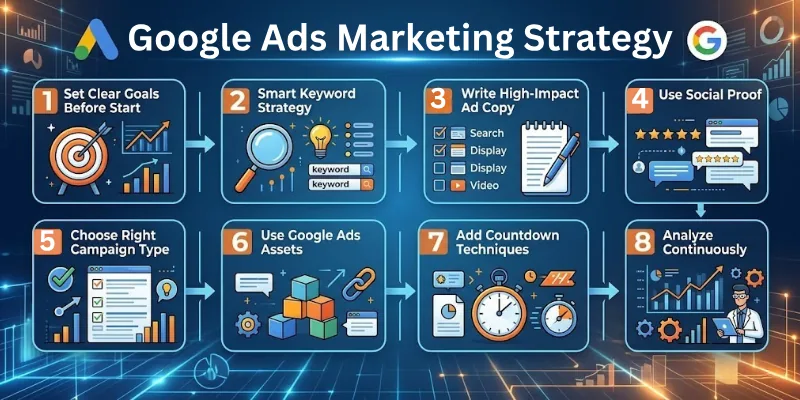
Here are some tips for Google Ads:
- Set Clear Goals Before You Start
- Smart Keyword Strategy
- Choose Right Campaign Type
- Write High-Impact Ad Copy
- Use Social Proof and Offers
- Use Google Ads Assets & Extensions
- Add Countdown & Urgency Techniques
- Analyze & Optimize Continuously
Let’s cover Google Ads tips in detail.
1. Set Clear Goals Before You Start
Starting your Google Ads journey without clear goals is like sailing without a map. Knowing exactly what you want to achieve helps you plan better and spend your budget wisely. Your goals will guide every decision, from keywords to campaign type.
- Decide your objective: sales, leads, traffic, or brand awareness.
- Match campaign type to goal: Search Ads for sales, Display Ads for awareness.
- Allocate the budget wisely based on the goal.
- Track performance to see if campaigns meet targets.
2. Smart Keyword Strategy
Keywords are the foundation of your Google Ads success. Choosing the right keywords ensures your ads reach the people who are most likely to take action. Start simple, focus on relevance, and refine them as you go.
- Research relevant keywords using tools like Google Keyword Planner.
- Use long-tail keywords for higher intent and lower cost.
- Add negative keywords to prevent irrelevant clicks.
- Group keywords by theme for better ad relevance and quality score.
- Regularly update keywords based on performance and trends.
3. Choose Right Campaign Type
The type of campaign you choose determines who sees your ads and how well they perform. Choosing wisely helps you reach the right audience and achieve your goals faster. Start with one or two campaign types and expand later.
- Search Ads Strategy: Target users actively searching for products/services.
- Display Ads: Build brand awareness across websites.
- Shopping Ads: Show product images, prices, and store names.
- Video/YouTube Ads: Engage users and tell your brand story.
- Performance Max: Use Google AI to optimize across networks.
4. Write High-Impact Ad Copy
Your ad copy is your first impression. Good copy grabs attention, explains the benefit, and motivates users to click. Writing clear, persuasive, and relevant ads makes a big difference in performance.
- Create clear headlines that highlight benefits or solutions.
- Include a strong CTA like “Buy Now” or “Get a Free Quote”.
- Highlight offers, promotions, or discounts.
- Match ad copy to landing pages for better conversions.
- Use numbers or facts to make your ad trustworthy.
- Test multiple ad variations to find the best-performing ones.
5. Use Social Proof and Offers
People trust recommendations more than claims. Adding social proof and special offers makes your brand credible and encourages users to take action quickly. This can boost both clicks and conversions.
- Show customer reviews or ratings.
- Highlight testimonials to build credibility.
- Offer discounts, free trials, or risk-free guarantees.
- Combine offers with urgency for faster action.
6. Use Google Ads Assets & Extensions
Google Ads extensions make your ads more informative and engaging, helping users take action faster. Using the right extensions can improve visibility, clicks, and overall campaign performance.
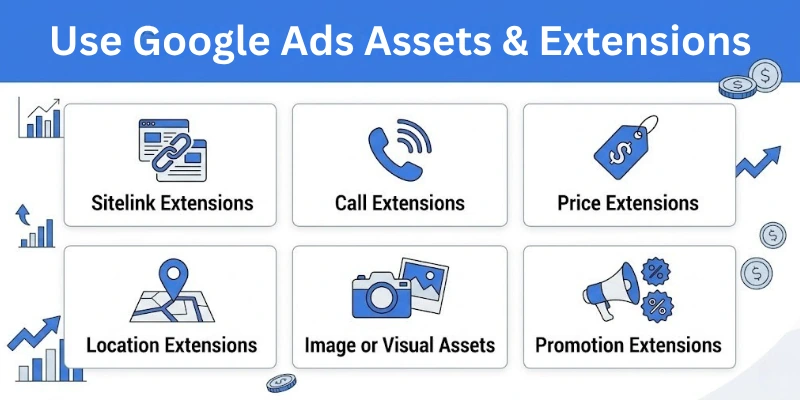
- Sitelink Extensions: Link to multiple pages.
- Call Extensions: Enable mobile users to call directly.
- Price Extensions: Show product prices in ads.
- Location Extensions: Display your business address.
- Image or Visual Assets: Grab attention on display or shopping ads.
- Promotion Extensions: Highlight discounts or limited-time deals.
7. Add Countdown & Urgency Techniques
Creating urgency motivates users to act fast. Using countdowns, limited-time offers, or scarcity messages can significantly improve click-through rates and conversions.
- Highlight limited-time offers.
- Use countdown timers in ad text.
- Emphasize scarcity, like limited stock.
- Use action-oriented words like “now”, “today”, or “hurry”.
8. Analyze & Optimize Continuously
Even the best ads can improve with regular review. Continuously analyzing your campaigns allows you to reduce wasted spend and get the most out of your budget. Adjust, test, and refine for the best results.
- Track metrics: CTR, CPC, conversion rate, ROAS.
- Pause low-performing ads or keywords.
- Adjust bids, budgets, and targeting regularly.
- Test ad variations to find the most effective versions.
- Update keywords and review audience targeting for better results.
Google Ads Optimization Tips
Small, consistent improvements can make a big difference. Optimizing your campaigns regularly ensures you spend your budget wisely and get the best performance possible.
- Improve the quality score by keeping ads, keywords, and landing pages relevant.
- Test multiple ad versions (headlines, descriptions, and CTAs).
- Refine audience targeting by location, interests, and devices.
- Ensure landing pages are fast, clear, and relevant.
- Monitor metrics and pause underperforming ads.
- Adjust bids and budgets based on performance trends.
- Use negative keywords to avoid irrelevant clicks.
- Track conversion actions to understand which ads drive results.
- Schedule ads for peak performance times when your audience is most active.
- Continuously add new keywords based on trending searches.
Google Ads Strategies for Beginners
Starting small helps you learn quickly without wasting money. Beginner strategies focus on simple steps that build a strong foundation for future campaigns.
- Set clear goals before creating campaigns.
- Start with a small budget to test what works.
- Use Search or Shopping Ads first.
- Set up conversion tracking to measure results accurately.
- Focus on one or two campaigns at a time to avoid confusion.
- Use high-intent keywords that match your products/services.
- Regularly check performance and adjust campaigns accordingly.
- Keep ad copy simple and clear for easy understanding.
- Monitor competitor ads to get ideas and improve your campaigns.
- Learn from analytics reports to improve strategy gradually.
Strategies to Increase Sales with Google Ads
To boost Google Ad sales, focus on tactics that reach the right audience, highlight offers, and create urgency. These techniques convert visitors into buyers more effectively.
- Show ads to previous visitors using remarketing campaigns.
- Target users actively searching for your products (in-market audiences).
- Include offers, discounts, or free shipping to encourage purchases.
- Create campaigns for seasonal events or holidays.
- Use Performance Max campaigns to leverage Google AI optimization.
- Add urgency messages or countdowns in ad copy.
- Continuously test headlines, CTAs, and offers for best performance.
- Focus on high-performing keywords and pause low-performing ones.
- Test different ad formats like text, display, or video to see what converts best.
- Segment audiences by location, device, or demographics to increase relevancy.
PPC Advertising Tips
Managing PPC campaigns well requires focus, strategy, and regular attention. Following these tips ensures your campaigns deliver maximum results with minimum waste.
- Use long-tail keywords to target high-intent users.
- Match landing pages to ads for a better user experience.
- Monitor CTR, CPC, and ROAS regularly.
- Remove underperforming keywords or ads.
- Test automated bidding strategies for efficiency.
- Focus on ad relevance and audience targeting.
- Keep campaigns organized and simple for easy management.
- Use ad scheduling to show ads at the best times.
- Test different match types (broad, phrase, exact) for better targeting.
- Combine remarketing with new audience targeting for higher conversions.
Wrapping Up
In this article, we’ve covered Google Ads tips in detail. I personally recommend setting clear goals and reviewing your campaigns regularly because small improvements can make a big difference.
When you focus on the right audience and keep testing ads, success becomes easier over time. Take action now, use these tips in your next campaign, and start improving your Google Ads performance today.
That’s all for today—goodbye and happy Google Ads optimizing!
FAQs: Google Ads Strategy
If you are new to Google Ads or want to improve your results, these frequently asked questions about Google Ads tips will help you understand the basics and make better decisions:
Effective Google Ads strategies start with clear goals, smart keyword research, and targeted campaigns. Begin with Search or Shopping ads, track results, and adjust your budget and keywords based on performance.
To create effective Google Ads, focus on:
- Choosing relevant keywords
- Writing clear, benefit‑driven ad copy
- Using ad extensions like sitelinks
- Testing different versions of your ads
These steps help your ads reach users more likely to click and convert.
Good Google advertising tips include using long‑tail keywords, adding negative keywords to avoid irrelevant clicks, and regularly checking your campaign metrics like CTR and ROI.
You can check metrics like click‑through rate (CTR), cost per click (CPC), conversion rate, and return on ad spend (ROAS). These numbers show whether your ads attract interest and lead to real results.
Not always. A good strategy changes based on your goal. For example, search campaigns work best for direct sales, and shopping campaigns help e-commerce products. Always test and refine your method.
Start with a small daily budget until you see what works. As your ads show results, you can increase spending on the best campaigns. This prevents overspending while you learn.
No. You can learn the basics quickly. Most beginners start with keyword research, clear ad copy, and simple bidding options. With regular testing and adjustment, you improve over time.
A strong Google marketing campaign plan includes
- Clear objective (sales, leads, awareness)
- Targeted keywords
- Well‑written ads
- Regular analysis and changes
Starting with these steps helps keep your campaign focused and effective.




- Be Respectful
- Stay Relevant
- Stay Positive
- True Feedback
- Encourage Discussion
- Avoid Spamming
- No Fake News
- Don't Copy-Paste
- No Personal Attacks
- Be Respectful
- Stay Relevant
- Stay Positive
- True Feedback
- Encourage Discussion
- Avoid Spamming
- No Fake News
- Don't Copy-Paste
- No Personal Attacks
