Pros and Cons of WooCommerce – Grow Your Store in 2026
Published: 10 Apr 2026
Are you unsure whether WooCommerce is the right platform for your online store? Many business owners struggle to decide because WooCommerce offers incredible flexibility but also requires technical know-how.
In this article, we will cover the pros and cons of WooCommerce to help you make an informed decision. You will learn what makes it easy to customize, SEO-friendly, and cost-effective, as well as the challenges like setup and maintenance.
By understanding both sides, you can confidently decide if WooCommerce fits your business goals and plan your store in a way that maximizes its advantages while avoiding common pitfalls.
So, guys, don’t go anywhere; let’s dive into it all step by step.
Benefits of WooCommerce
WooCommerce is one of the most popular tools for online stores, especially for WordPress users. It offers many features that help businesses sell products easily and grow over time.
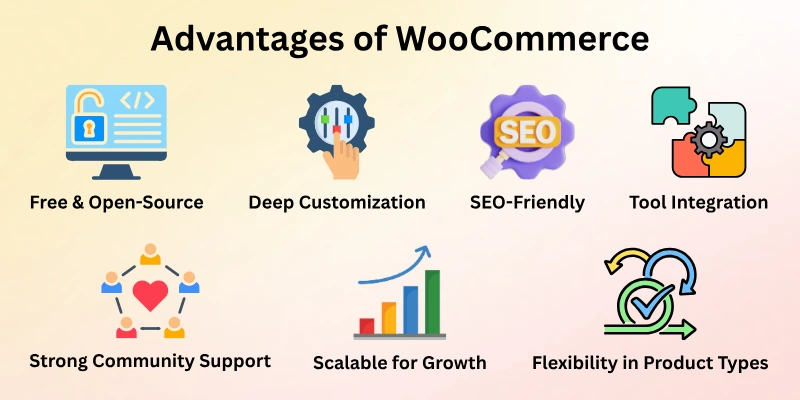
Here is the list of advantages of WooCommerce:
- Free and Open-Source
- Deep Customization
- SEO-Friendly
- Huge Plugin and Tool Integration
- Strong Community Support
- Flexibility in Product Types
- Scalable for Growth
Let’s examine them one by one.
1. Free and Open-Source
Many online sellers choose WooCommerce because it does not charge a license fee. Anyone can download and use it without paying up front. This makes it easier to start an online store with a small budget. Business owners can spend more on marketing and product quality instead. Open access also allows easy improvements and changes.
- No payment required to launch a store
- Ideal for budget-friendly projects
- Freedom to change or improve features
- Good choice for new businesses
2. Deep Customization
Store owners get full freedom to design their shop their own way. Layouts, colours, and features can be changed at any time. This helps create a strong brand identity. A unique store design also improves customer trust. WooCommerce supports both simple and advanced custom work.
- Custom checkout and product pages
- Brand-focused store design
- Easy feature upgrades
- Control over user experience
3. SEO-Friendly
Search engines work well with WooCommerce because it runs on WordPress. Store pages are easy to optimize for keywords. This helps products appear in search results faster. Better visibility brings more visitors without paid ads. SEO tools make updates simple and quick.
- Better ranking for product pages
- Simple image optimization
- Blog support for content growth
- Easy keyword placement
4. Huge Plugin and Tool Integration
Running an online store becomes easier with the right tools. WooCommerce supports many plugins for payments, shipping, and promotions. These tools help automate daily tasks. Store owners can add features as the business grows. Only the needed tools can be installed, keeping the site clean.
- Flexible payment methods
- Marketing tool connections
- Shipping rate automation
- Sales tracking tools
5. Strong Community Support
Help is easy to find when using WooCommerce. Thousands of users share guides, solutions, and tips online. Beginners can learn step by step without stress. Experienced developers also offer advice and fixes. This support system saves time and effort.
- Active user discussions
- Free learning material
- Global developer help
- Regular updates and tips
6. Flexibility in Product Types
Different business ideas can run on one platform. WooCommerce allows sellers to offer many product types together. This supports business growth and testing new ideas. Store owners can add new products without limits. It works well for mixed stores.
- Digital downloads support
- Service-based selling
- Affiliate product options
- Easy product switching
7. Scalable for Growth
Growth becomes smoother with the right setup. WooCommerce supports small stores and growing businesses. Better hosting improves speed and performance. New features can be added without changing platforms. This makes long-term planning easier.
- Supports growing traffic
- Easy store expansion
- Performance control options
- Reliable for long-term use
Disadvantages of WooCommerce
While WooCommerce offers many benefits, it is not perfect for every business. Some challenges can make setup and management harder, especially for beginners. Understanding these drawbacks helps you plan better and avoid surprises.
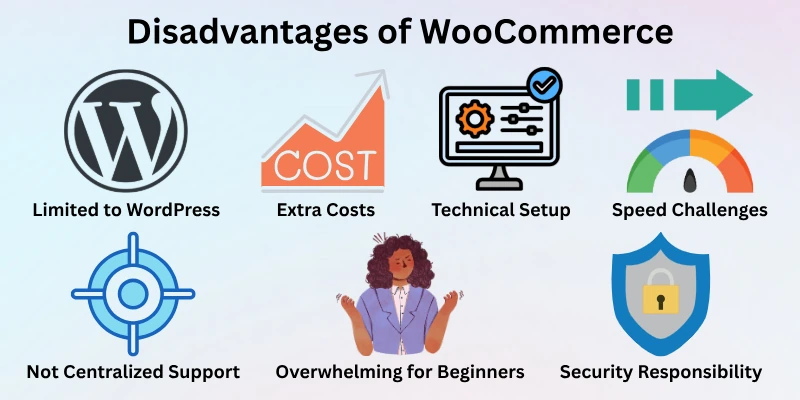
Here are the main disadvantages explained clearly.
- Limited to WordPress
- Extra Costs
- Technical Setup and Maintenance
- Performance and Speed Challenges
- Not Centralized Support
- Security Responsibility
- Overwhelming for Beginners
Now, it’s time to dive into the details.
1. Limited to WordPress
WooCommerce only works on WordPress websites. This means businesses using other platforms cannot use it without moving their site. For some, this limitation can be a barrier. It also requires familiarity with WordPress to manage the store effectively.
- Cannot run on other website platforms
- Needs WordPress knowledge
- May require learning new skills
- Limits flexibility for non-WordPress users
2. Extra Costs
Although the core plugin is free, additional tools often cost money. Premium themes, paid extensions, better hosting, and security add-ons can increase expenses. For large stores, these costs can grow quickly. Budget planning is necessary to avoid unexpected spending.
- Paid plugins and themes increase the budget
- Hosting and security can be expensive
- Premium tools may be needed for advanced features
- Costs grow with store size
3. Technical Setup and Maintenance
Setting up WooCommerce can be tricky for beginners. Installing plugins, configuring settings, and managing updates requires some technical knowledge. Ongoing maintenance is also necessary to keep the store running smoothly. Without proper care, issues like downtime or errors can occur.
- Initial setup can be complex
- Regular updates required
- Needs basic technical skills
- Troubleshooting may take time
4. Performance and Speed Challenges
Stores with many products or heavy plugins can become slow. Website speed affects customer experience and search rankings. Choosing good hosting and optimizing plugins is essential to maintaining performance. Otherwise, slow pages can reduce sales.
- Large catalogs may slow down the site
- Multiple plugins affect loading speed
- Hosting quality impacts performance
- Optimization is necessary for growth
5. Not Centralized Support
WooCommerce does not offer a single support channel. Users rely on community forums, tutorials, or paid developers for help. Beginners may find this confusing at first. Quick problem resolution often requires extra effort or budget.
- No official centralised support
- Rely on forums and guides
- Paid developers may be needed
- Learning curve for self-help
6. Security Responsibility
The store owner must handle backups, updates, and security measures. Unlike fully hosted platforms, WooCommerce does not manage these automatically. This can be risky if proper steps are not followed. Strong security practices are essential to protect customer data.
- Backups need to be managed manually
- Updates are the owner’s responsibility
- Extra security plugins may be needed
- Risk of vulnerabilities if neglected
7. Overwhelming for Beginners
With so many options and features, new users can feel confused. Choosing plugins, themes, and settings requires research. Without guidance, beginners may make mistakes that affect sales or site speed. Learning gradually and testing features carefully is important.
- Many features to manage
- Requires planning and learning
- Mistakes can impact performance
- Best suited for users willing to invest time
Who Should Use WooCommerce?
WooCommerce is best suited for people and businesses who want flexibility and control over their online store. It works perfectly for those already using WordPress or planning to build a WordPress site.
Entrepreneurs who want to customize every aspect of their store will find it very useful. At the same time, it fits businesses that plan to grow gradually and add new features over time.
Ideal users
- Small and medium business owners looking for cost-effective solutions
- Bloggers or content creators selling products or services online
- Companies want full control over store design and functionality
- Entrepreneurs planning long-term growth with flexible options
Who might avoid it
- Businesses not using WordPress or are unwilling to learn it
- Beginners who prefer fully hosted, plug-and-play platforms
- Large enterprises needing out-of-the-box support and speed
Final Words
In this guide, we have covered the pros and cons of WooCommerce. While WooCommerce offers great flexibility, customization, and growth potential, it also comes with challenges like technical setup, extra costs, and ongoing maintenance.
To balance these limitations, it’s important to plan carefully, choose reliable hosting, use only necessary plugins, and regularly update your store. With the right approach, you can enjoy the benefits while managing the risks effectively.
Thank you for taking the time to read this guide. I hope it supports you in building a successful online store.
FAQs: Pros and Cons of WooCommerce
Here are some frequently asked questions to help you understand WooCommerce better.
WooCommerce pros and cons help beginners understand what to expect before building a store. The platform is flexible, SEO-friendly, and free to start, but it requires regular updates and technical setup. Knowing these points can save time and make your online store run smoothly.
Yes, WooCommerce works well for small businesses because it is cost-effective and customizable. You can start with basic features and gradually add extensions as your business grows. Many small store owners use WooCommerce to sell products online without high upfront costs.
While WooCommerce itself is free, setting up a professional store may involve costs for hosting, themes, and premium plugins. These expenses vary depending on the size and needs of your store. Planning your budget carefully ensures you get the most out of the platform without surprises.
Yes, WooCommerce can scale for large stores, but it requires proper hosting and optimization. Adding too many plugins or large product catalogs without planning can slow down your site. With the right setup, WooCommerce can manage thousands of products efficiently.
The Pros and cons of WooCommerce compared to Shopify include flexibility versus simplicity. WooCommerce gives full control over design and features, while Shopify is easier for beginners but less customizable. Choosing between them depends on your technical comfort and growth plans.
Securing your WooCommerce store is important to protect customer data and payments. You should use SSL certificates, strong passwords, and regular updates. Adding security plugins and reliable hosting can prevent the most common risks.



- Be Respectful
- Stay Relevant
- Stay Positive
- True Feedback
- Encourage Discussion
- Avoid Spamming
- No Fake News
- Don't Copy-Paste
- No Personal Attacks
- Be Respectful
- Stay Relevant
- Stay Positive
- True Feedback
- Encourage Discussion
- Avoid Spamming
- No Fake News
- Don't Copy-Paste
- No Personal Attacks
