Pros and Cons of Canva for Small Businesses in 2026
Published: 19 Apr 2026
Have you ever wondered if Canva is actually good for your business or if it just looks easy on the surface?
Many people start using it because it feels simple, but later they question if it is enough for serious work. With so many design tools available, choosing the right one can feel confusing.
I have seen many business owners struggle with this decision. Canva can help you create designs quickly, but it also has limits that people often ignore in the beginning.
That is why it is important to clearly understand the Canva pros and cons in business before you depend on it for your brand.
We will discuss the pros and cons of Canva in business in detail, along with practical examples, so you can make the right choice.
Pros of Canva in Business
Canva offers many advantages for businesses that need quick and effective design solutions. It helps teams create professional content without needing advanced design skills. This makes it a practical tool for marketing, branding, and everyday visual tasks.
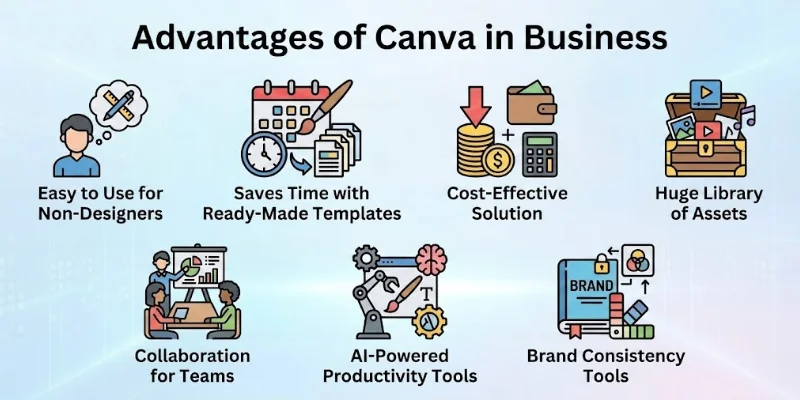
The following are some advantages of Canva in business:
- Easy to Use for Non-Designers
- Saves Time with Ready-Made Templates
- Cost-Effective Solution
- Huge Library of Assets
- Collaboration for Teams
- AI-Powered Productivity Tools
- Brand Consistency Tools
Let’s look at all the benefits of Canva in detail.
1. Easy to Use for Non-Designers
Canva makes design simple for anyone who has no design background. You do not need to learn complex tools or spend weeks practicing. Everything works with drag and drop, so you can create designs in minutes.
I have personally seen beginners create professional-looking posts on their first try. The interface feels clean and easy to understand, which helps people focus on their work instead of struggling with tools.
Here is what makes it beginner-friendly:
- No technical or design skills required
- Simple drag-and-drop editor
- Clean and easy navigation
- Ready-to-use layouts for a quick start
2. Saves Time with Ready-Made Templates
Canva helps you create designs much faster by offering ready-made templates. You do not have to start from scratch every time, which saves a lot of effort, especially for daily tasks.
From my experience, this is one of the biggest advantages for businesses that need regular content. You just pick a template, adjust it, and your design is ready within minutes.
This speed comes from features like the following:
- Thousands of pre-designed templates
- Quick editing with minimal effort
- Easy customization for different platforms
- Ideal for social media and marketing content
3. Cost-Effective Solution
Canva is a budget-friendly option for businesses that cannot afford professional designers. The free version already offers many useful features that cover basic needs.
I have seen small businesses rely fully on Canva to manage their design work. Even the paid version costs much less compared to hiring a full-time designer or agency.
This makes it cost-effective because
- Free plan available with useful tools
- Affordable premium plans
- Reduces the need for hiring designers
- Good value for small businesses
4. Huge Library of Assets
Canva provides a large collection of design assets in one place. You can find images, icons, videos, and fonts without searching on different platforms.
In my work, this saves a lot of time because everything is available inside the tool. You do not need to switch between multiple websites to complete one design.
This library includes:
- Stock photos and videos
- Icons, shapes, and graphics
- Wide range of fonts
- Built-in elements for different industries
5. Collaboration for Teams
Canva allows teams to work together on the same design in real time. This is very useful for businesses with remote teams or multiple team members.
I have worked on shared projects where everyone could edit and comment at the same time. It makes the process faster and avoids confusion.
Team collaboration becomes easier with the following:
- Real-time editing and updates
- Shared folders and designs
- Commenting and feedback options
- Access control for team members
6. AI-Powered Productivity Tools
Canva now includes AI tools that help speed up the design process. These tools automate tasks that usually take more time when done manually.
From my experience, features like background remover and auto-resize make a big difference in productivity. They help complete work faster without extra effort.
These AI tools help by:
- Automating repetitive tasks
- Removing backgrounds quickly
- Resizing designs for multiple platforms
- Generating quick design suggestions
7. Brand Consistency Tools
Canva helps businesses maintain a consistent brand image through its brand kit feature. You can store your logo, colours, and fonts in one place.
I have seen how this keeps designs uniform across different platforms. It is especially useful for businesses that want to build a strong identity.
Brand consistency improves with:
- Brand kit for logos and colours
- Pre-set fonts and styles
- Easy reuse of brand elements
- Consistent look across all designs
Cons of Canva in Business
While Canva cons are important to consider, Canva is still a useful and easy design tool for businesses. It may not support highly advanced design work or complex customization. Businesses with professional design needs may require additional tools.
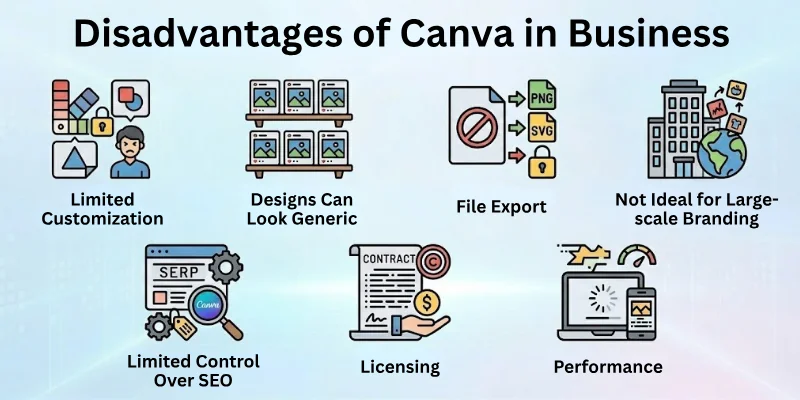
The following are some cons of using Canva in business:
- Limited Customization for Advanced Designs
- Designs Can Look Generic
- File Export and Format Limitations
- Not Ideal for Large-scale Branding
- Limited Control Over SEO and Websites
- Licensing and Ownership Concerns
- Performance and Dependency Issues
Let’s look at them in detail.
1. Limited Customization for Advanced Designs
Canva works well for simple designs, but it struggles when you need full creative control. If you want to create something unique or highly detailed, you may feel restricted by its features.
From my experience, this becomes clear when working on complex branding projects. The tool does not offer the depth that professional design software provides.
These limitations show up in areas like the following:
- Limited advanced editing options
- Not suitable for complex design projects
- Restricted control over detailed elements
- Less flexibility compared to a professional tool
2. Designs Can Look Generic
One common issue with Canva is that many designs start to look similar. Since thousands of users rely on the same templates, originality can become a problem.
I have noticed this especially on social media, where many posts look almost identical. This can weaken a brand’s uniqueness over time.
This happens because:
- Templates are widely used by many users
- Limited uniqueness in basic designs
- Harder to stand out from competitors
- Repetitive design patterns across platform
3. File Export & Format Limitations
Canva offers basic export options, but it does not fully support all professional file formats. This can be frustrating when you need high-quality or scalable outputs.
In my work, I have faced issues when exporting files for printing or advanced editing. The lack of flexibility can slow down professional workflows.
These limitations include:
- Limited vector file support
- Fewer export format options
- Quality issues in some file types
- Less control over file setting
4. Not Ideal for Large-Scale Branding
Canva is not the best choice for building a complete brand identity system. Large businesses often need detailed design systems that Canva cannot fully support.
I have seen companies switch to advanced tools when they grow because Canva does not meet their long-term branding needs.
This becomes clear when
- Creating full brand identity systems
- Managing complex design guidelines
- Handling large-scale branding projects
- Requiring high-level creative control
5. Limited Control Over SEO & Websites
Canva also offers website features, but they are quite basic. It does not provide strong control over SEO or customization, which is important for business growth.
From my experience, businesses that rely on organic traffic need more advanced website tools than Canva can offer.
This limitation includes:
- Basic website customization options
- Limited SEO control
- Not ideal for long-term website growth
- Fewer integrations compared to website builders
6. Licensing & Ownership Concerns
Canva provides many templates and assets, but they are not fully unique. This can raise concerns about originality and ownership.
I have noticed that businesses sometimes overlook this, but it can affect brand identity if the same elements appear elsewhere.
These concerns include:
- Templates are not exclusive
- Shared assets across multiple users
- Limited uniqueness in designs
- Possible confusion in brand identity
7. Performance & Dependency Issues
Canva is a web-based tool, which means it depends on internet access. Without a stable connection, your work can slow down or stop.
I have experienced delays and slow exports during heavy usage, which can be frustrating when working on deadlines.
These issues usually involve:
- Requires a stable internet connection
- Occasional lag during editing
- Slow export times for large files
- Performance issues on low-end devices
When Should Businesses Use Canva?
Canva works best when businesses need quick and simple design solutions without investing too much time or money. It is built for speed and ease, which makes it a practical choice for everyday tasks.
Here are the situations where Canva makes the most sense:
- Small businesses that cannot afford a full-time designer
- Startups that need fast and budget-friendly design solutions
- Social media marketers who create content daily
- Quick design needs like posts, flyers, presentations, and ads
- Freelancers who handle multiple clients and need fast design delivery
- Businesses that need simple branding materials quickly
- Teams working remotely who need easy collaboration tools
- Anyone with no design skills but regular content needs
When Canva is NOT the Right Choice?
Canva is useful for simple and quick design tasks, but it does not fit every business situation. When your needs become more advanced, its limitations start to show clearly.
From my experience, businesses that focus on strong branding and high-quality design often outgrow Canva. In such cases, relying only on it can affect the overall quality of work.
Here are the situations where Canva is not the right choice:
- Large enterprises that require complex design systems
- Agencies that handle high-level creative projects
- Advanced branding projects that need full customization
- High-end design needs where originality and precision matter
- Projects that demand unique, custom-made designs from scratch
- Teams that rely on advanced tools like Adobe software
Real-World Use Cases
Canva becomes truly valuable when you use it in everyday business situations. It is not just a design tool; it is something many businesses rely on to keep their content flowing without delays.
In my experience, the real strength of Canva shows when you need to produce content quickly and consistently. It helps simplify tasks that would otherwise take much more time with complex tools.
Let’s look at where Canva fits best in real business use:
- Social media posts, stories, and ads
- Pitch decks and business presentations
- E-commerce product images, banners, and promos
- Freelancers vs. agencies: use case comparison
- Email marketing visuals and newsletters
- Blog images and website graphics
- Event posters and promotional materials
- Short videos for social media platforms
Is Canva Worth it for Businesses in 2026?
Canva software still offers strong value for most businesses in 2026, especially for those that need quick, simple, and consistent design work. Its pricing stays affordable compared to hiring designers or using advanced software, which makes it a practical tool for everyday marketing needs.
Pricing vs Value
Canva’s pricing is flexible and suits different business needs. The free plan covers basic use, while paid plans add branding tools, AI features, and team collaboration. The main value comes from saving time and reducing design costs.
- Free plan: Basic use
- Pro plan: Best for freelancers and small businesses
- Teams plan: Ideal for collaboration and growing teams
Value increases with frequent content creation
Conclusion
In this guide, we have covered the pros and cons of Canva in business. Canva offers strong value for fast, simple, and cost-friendly design work. It helps small teams and marketers create content quickly. However, it still has limitations when it comes to advanced design and complex branding needs.
Canva works best for small businesses, startups, freelancers, and social media marketers. It is not the right choice for large enterprises, agencies, or projects that need high-end creative control and unique design systems.
I personally recommend Canva for daily business marketing work where speed matters more than perfection. It is a smart tool if you use it in the right way and understand its limits.
Thank you for reading this guide. Have a great day ahead.
Don’t skip the next part of the FAQs. I hope you will find something more interesting, so don’t miss it. If you miss it, you may lose something new.
FAQs: Pros and Cons of Canva
Below are some important questions and answers you should know related to the advantages and disadvantages of Canva:
Canva helps businesses create designs quickly without professional skills. It is affordable and great for daily marketing tasks. However, it has limits in advanced customization and branding control.
Yes, Canva is good for basic photo editing like cropping, filters, and background removal. It works well for social media images and simple business graphics. But it cannot replace advanced tools like Photoshop for professional editing.
Canva is a cloud-based graphic design software. It runs online and also has mobile and desktop apps. It is mainly used for creating visual content like posts, presentations, and marketing materials.
Canva is good for simple video editing, like short clips, social media videos, and presentations. It offers templates and drag-and-drop editing for beginners. However, it is not suitable for advanced video production.
No, Canva is very easy to use even for beginners. It has a simple drag-and-drop interface that requires no technical skills. Most users can create designs within minutes of starting.
The Canva app comes with many useful tools that help users create designs quickly and easily. Here are its main features:
- Ready-made templates for posts, presentations, and ads
- Drag-and-drop editor for simple design work
- Large library of images, icons, fonts, and graphics
- AI tools for faster and smarter design creation
- Background remover for quick photo editing
Canva cannot fully replace professional designers for complex branding work. It is best for simple and fast design needs. Businesses often use it alongside designers for better results.



- Be Respectful
- Stay Relevant
- Stay Positive
- True Feedback
- Encourage Discussion
- Avoid Spamming
- No Fake News
- Don't Copy-Paste
- No Personal Attacks
- Be Respectful
- Stay Relevant
- Stay Positive
- True Feedback
- Encourage Discussion
- Avoid Spamming
- No Fake News
- Don't Copy-Paste
- No Personal Attacks
