Email Marketing Types – Simple Ways to Improve Results
Published: 10 Mar 2026
Have you ever wondered why some emails get your attention while others are quickly ignored? The secret is that effective emails are useful, relevant, and simple to interact with.
Email marketing enables businesses to send messages directly to customers’ inboxes, sharing updates, offers, tips, or important information in a personal and helpful manner.
In this article, we will look at the various types of email marketing and explain how each one helps businesses communicate with their customers clearly and effectively.
Email Marketing Types
There are different kinds of email marketing, and each one helps you connect with your readers in a different way.
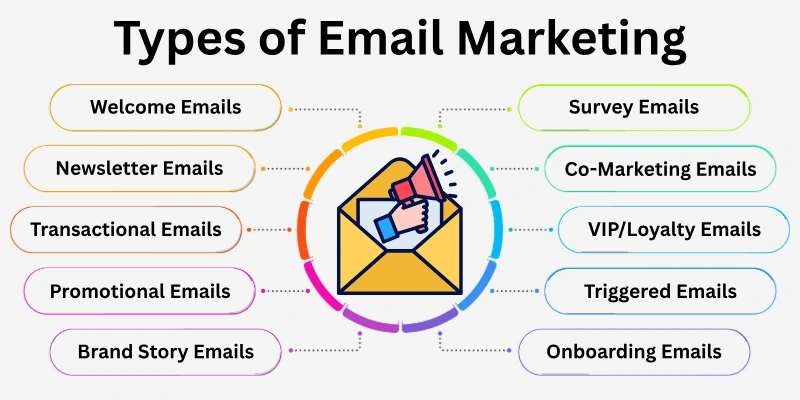
Here are the 20 most important types of email marketing you need to know about:
- Welcome Emails
- Newsletter Emails
- Promotional Emails
- Transactional Emails
- Abandoned Cart Emails
- Re-Engagement Emails
- Drip/Onboarding Emails
- Event & Webinar Emails
- Feedback & Review Request Emails
- Upsell & Cross-Sell Emails
- Seasonal/Holiday Emails
- Brand Story Emails
- Survey Emails
- Dedicated Send Emails
- Milestone/Anniversary Emails
- Content/Resource Emails
- VIP/Loyalty Emails
- Product Launch Emails
- Triggered Emails
- Co-Marketing Emails
It’s time to look into all the different types of email marketing.
1. Welcome Emails
Welcome emails are friendly messages sent to new subscribers or users when they first join your email list or platform. These emails introduce your brand, explain what users can expect, and make them feel valued and appreciated. They help create a strong first impression and guide users on the next steps they should take.
When to Use
Send a welcome email right after someone signs up, downloads something, or creates an account. It helps start a good relationship and sets clear expectations for the user.
Content / Structure
Here is what a welcome email usually has:
- A cheerful subject line
- Greeting addressing the subscriber
- Short introduction about your brand
- Information about what the user will get next
- One main action to take
- Friendly closing line
Helpful Tips
- Keep the tone warm and positive
- Use simple words
- Focus on one main action
- Send it immediately after signup
2. Newsletter Emails
Newsletter emails are regular messages sent to your subscribers to share tips, news, updates, or helpful information. They keep your audience engaged with your brand, provide value, and encourage them to interact with your website, blog, or products. Newsletters help maintain long-term relationships with your audience.
When to Use
Send newsletters weekly, biweekly, or monthly to keep your audience informed and engaged with your brand.
Content / Structure
A newsletter usually has:
- A clear subject line
- Greetings,
- Short updates or sections
- Useful tips or links
- Friendly closing
Helpful Tips
- Keep content short and clear
- Break text into sections
- Add helpful links
- Send on a regular schedule
3. Promotional Emails
Promotional emails are messages sent to your subscribers to share special offers, discounts, deals, or new products. They aim to encourage users to take action, such as making a purchase, signing up for an offer, or exploring new products. These emails are designed to attract attention and drive conversions.
When to Use
Send promotional emails during sales, product launches, seasonal offers, or special events to inform users about deals and motivate them to act.
Content/Structure
A promotional email usually includes:
- Catchy subject line
- Greetings,
- Details of the offer
- Clear call-to-action button
- Short closing line
Helpful Tips
- Show the main offer clearly
- Add visuals if possible
- Explain benefits simply
- Create urgency when needed
4. Transactional Emails
Transactional emails are automatic messages sent to users after they complete an action, like making a purchase, updating their account, or resetting a password. These emails provide important information about the user’s action and guide them on what to do next. They are essential for keeping users informed and ensuring a smooth experience.
When to Use
Send transactional emails whenever a user finishes a task that requires confirmation, such as orders, account changes, or form submissions.
Content / Structure
A transactional email usually includes:
- Clear subject line
- Greeting with the user’s name
- Details of the action
- Instructions for next steps if needed
- Contact info for support
Helpful Tips
- Keep wording simple and clear
- Include all important details
- Make links easy to find
- Send immediately after the action
5. Abandoned Cart Emails
Abandoned cart emails are reminders sent to users who added items to their cart but left without completing the purchase. These emails encourage users to return and finish their order while highlighting the items they were interested in.
When to Use
Send abandoned cart emails when someone leaves your site without buying after adding products to the cart.
Email Content / Structure
A typical abandoned cart email includes:
- Clear subject line
- Greetings,
- Reminder of items in the cart
- Button to return and complete purchase
- Optional discount or support offer
Helpful Tips
- Send the first reminder within a few hours
- Show product images
- Keep text short and clear
- Add one main call to action
6. Re-Engagement Emails
Re-engagement emails are sent to users who haven’t interacted with your emails or website for a while. These emails aim to remind users about your brand and encourage them to return or take action.
When to Use
Send re-engagement emails if a subscriber hasn’t opened emails, visited your website, or made a purchase in some time.
Content / Structure
A re-engagement email usually includes:
- Subject line reminding the user of your brand
- Greeting addressing the user
- Short message explaining what they are missing
- Button or link to return
- Optional reward or offer
Helpful Tips
- Personalize with user’s name
- Keep the message short and clear
- Focus on one action
- Send at the time users are likely to check emails
7. Drip / Onboarding Emails
Drip or onboarding emails are a series of automatic messages sent over time to help new users learn about your product or service step by step. They guide users gradually and provide helpful tips to increase engagement.
When to Use
Send drip emails when a user signs up, starts using your product, or needs guidance to understand features.
Content / Structure
A drip email sequence usually includes:
- Short subject lines
- Friendly greeting
- One tip or step in each email
- Link to a helpful guide or resource
- Call-to-action for the next step
Helpful Tips
- Send emails at small intervals
- Keep each email focused on one idea
- Use simple words for easy understanding
- Include helpful links or resources
8. Event & Webinar Emails
Event or webinar emails inform users about upcoming events, workshops, or online sessions. They provide all important details and motivate users to attend.
When to Use
Send event emails when hosting online/offline events or webinars and want users to register or participate.
Email Content/Structure
An event email usually includes:
- Subject line mentioning the event
- Greetings
- Event details: date, time, location/link
- Reasons to attend
- Registration or RSVP link
- Closing message
Helpful Tips
- Send initial invite and reminders
- Highlight key benefits of attending
- Keep instructions clear
- Make registration link easy to find
9. Feedback & Review Request Emails
Feedback emails request users to share opinions about your product, service, or experience. They help improve offerings and understand customer preferences.
When to Use
Send feedback emails after a purchase, service, or when collecting reviews for your products or website.
Email Content / Structure
A feedback email usually includes:
- Subject line inviting feedback
- Greeting using the user’s name
- Short message requesting opinion
- Link or form to provide feedback
- Optional reward or incentive
- Closing message
Helpful Tips
- Keep message polite and concise
- Make feedback easy in one click
- Send shortly after the action
- Personalize for better responses
10. Upsell & Cross-Sell Emails
Upsell and cross-sell emails suggest additional products or higher-value options based on what a user has bought or shown interest in. They encourage users to buy more and discover complementary items.
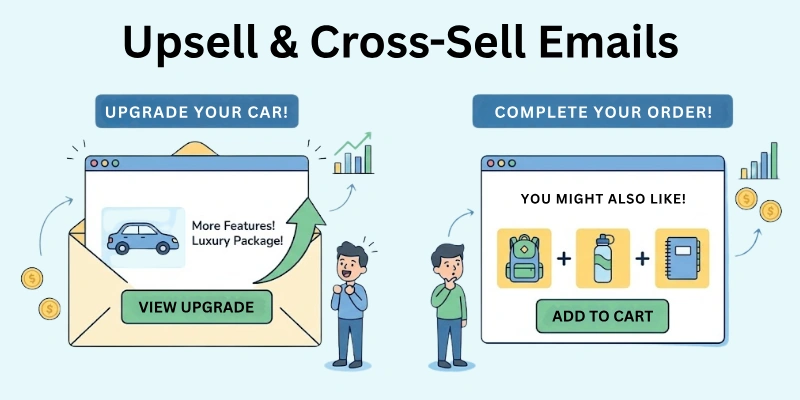
Send these emails after a purchase, when users browse products without buying, or to recommend upgrades or related products.
Email Content / Structure
A typical upsell/cross-sell email includes:
- Subject line presenting new or upgraded items
- Greeting addressing the customer
- Suggested products related to previous purchases
- Benefits of the recommended items
- Clear call-to-action button
- Closing message
Helpful Tips
- Recommend relevant items
- Show why items are useful
- Use product images
- Keep message focused on one main offer
11. Seasonal / Holiday Emails
Seasonal or holiday emails celebrate special occasions, holidays, or seasons. They often include themed offers, greetings, or promotions to engage users.
When to Use
Send these emails during holidays (like Christmas, New Year, and Eid) or seasonal events (like summer sales and back-to-school offers).
Email Content/Structure
A seasonal email usually includes:
- Subject line highlighting the holiday or season
- Festive greeting
- Special offers, discounts, or seasonal content
- Clear call-to-action
- Eye-catching visuals
- Closing message
Helpful Tips
- Use colorful, themed visuals
- Keep text cheerful and festive
- Highlight the offer clearly
- Send a few days before the event
12. Brand Story Emails
Brand story emails share your company’s story, values, or mission. They help users understand your brand and build an emotional connection.
When to Use
Send these emails when introducing your company to new subscribers, sharing achievements, or connecting emotionally with users.
Email Content/Structure
A brand story email usually includes:
- Subject line hinting at the story
- Greeting
- Narrative about the brand, mission, or journey
- Visuals or photos to illustrate
- Call-to-action to learn more
- Closing message
Helpful Tips
- Keep the story clear and simple
- Add visuals for engagement
- Focus on one main message per email
- Include a link for more details
13. Survey Emails
Survey emails ask users to answer questions about their experience, preferences, or opinions. They help gather insights and improve products or services.
When to Use
Send survey emails after a purchase, service, or when collecting feedback to improve offerings.
Content/Structure
A survey email usually includes:
- Subject line inviting participation
- Greeting
- Short explanation of survey purpose
- Link or button to survey
- Optional reward
- Closing message
Helpful Tips
- Keep surveys short and simple
- Explain why feedback is valuable
- Send shortly after relevant interaction
- Personalize messages for better responses
14. Dedicated Send Emails
Dedicated emails focus on a single topic, product, or announcement. They don’t include extra content, keeping attention on the main message.
When to Use
Send these emails for product launches, important announcements, or promoting one specific offer.
Content / Structure
A dedicated email usually includes:
- Subject line focused on the main topic
- Greetings,
- Short explanation of the topic or offer
- Call-to-action
- Supporting visuals
- Closing message
Helpful Tips
- Keep focus on one main point
- Use concise, clear language
- Include strong call to action
- Avoid unrelated content
15. Milestone/Anniversary Emails
Milestone or anniversary emails celebrate special dates related to a user, like account anniversaries, birthdays, or loyalty milestones.
When to Use
Send these emails to celebrate a first purchase anniversary, signup date, or long-term engagement.
Content / Structure
A milestone email usually includes:
- Subject line celebrating the milestone
- Greetings,
- Message acknowledging achievement
- Optional reward or offer
- Call-to-action
- Closing message
Helpful Tips
- Personalize the message
- Include a small reward
- Keep tone positive and celebratory
- Make the email visually appealing
16. Content/Resource Emails
Content or resource emails share helpful articles, guides, videos, or tools with subscribers. They educate, provide value, and solve problems for your audience.
When to Use
Send content/resource emails to provide educational material, share blogs, eBooks, or guides, and maintain engagement.
Content/Structure
A content email usually includes:
- Subject line highlighting the resource
- Greetings,
- Short description of content and its benefit
- Link or button to access
- Optional visuals
- Closing message
Helpful Tips
- Clearly explain content value
- Use simple language
- Highlight one main call to action
- Send regularly but not too often
17. VIP / Loyalty Emails
VIP or loyalty emails reward loyal customers with special offers, exclusive access, or recognition. They make top customers feel valued.
When to Use
Send these emails to thank frequent customers, offer exclusive deals, or give early access.
Content/Structure
A VIP/loyalty email usually includes:
- Subject line emphasizing exclusivity
- Greeting addressing the customer
- Message acknowledging loyalty
- Details of special offers
- Call-to-action
- Closing message
Helpful Tips
- Personalize the email
- Emphasize exclusivity
- Include clear instructions to claim offers
- Send at moments that feel special
18. Product Launch Emails
Product launch emails introduce a new product or service. They inform subscribers about features, benefits, and how to buy or access it.
When to Use
Send product launch emails when releasing new products, announcing updates, or building excitement before launch.
Email Content / Structure
A product launch email usually includes:
- Subject line announcing the product
- Greetings
- Key features or benefits
- Images or videos
- Call-to-action
- Closing message
Helpful Tips
- Highlight unique features
- Use visuals to attract attention
- Keep text clear and persuasive
- Build anticipation before sending
19. Triggered Emails
Triggered emails are automatic messages sent after a user completes a specific action, like signing up, purchasing, or browsing a product. They respond instantly to user behaviour.
When to Use
Send triggered emails after actions such as signup, purchase, cart abandonment, or specific interactions.
Email Content / Structure
A triggered email usually includes:
- Subject line related to the action
- Greeting with user’s name
- Details of the action
- Confirmation or next steps
- Call-to-action
- Closing message
Helpful Tips
- Make emails timely and relevant
- Keep message short and clear
- Include all necessary info
- Personalize based on user action
20. Co-Marketing Emails
Co-marketing emails are sent in partnership with another brand to promote joint products, services, or campaigns. They help reach a wider audience and add value for users.
When to Use
Send co-marketing emails during partnerships, joint promotions, or shared content campaigns.
Content/Structure
A co-marketing email usually includes:
- Subject line showing collaboration
- Greetings
- Description of partnership and benefits
- Call-to-action
- Optional visuals or logos
- Closing message
Helpful Tips
- Mention both brands clearly
- Highlight benefits for users
- Keep content simple and concise
- Ensure visuals match both brand styles
Conclusion
In this article, we explored different types of email marketing, from welcome and newsletter emails to product launches and loyalty campaigns.
Each type helps you reach your audience in a meaningful way and makes your messages more engaging. When you know the right type to use at the right time, you can build stronger connections and get better results.
Check out the FAQs below for quick answers to common questions. Give these ideas a try and see how they can improve your email marketing today.
FAQs: Types of Email Marketing
Here’s a list of questions we often get about types of email marketing:
Types of email marketing include welcome emails, newsletters, promotional emails, transactional emails, and loyalty emails. Each type serves a different purpose to connect with your audience and grow your business.
To start email marketing, choose an email platform, create a list of subscribers, and plan your first campaign. Begin with simple emails like welcome messages or newsletters to engage your audience.
Email marketing steps include building your email list, choosing the right type of email, designing the content, sending it to subscribers, and analyzing the results to improve future campaigns.
Knowing types of email marketing helps you send the right message to the right people. It improves engagement, increases sales, and keeps your audience interested in your brand.
Beginners can start with welcome emails or newsletters. These are easy to create, help build trust, and allow you to practice sending emails without overwhelming your audience.
It depends on the type. Newsletters can be weekly or monthly, promotional emails when you have offers, and transactional emails immediately after an action. Balance is key to avoid annoying subscribers.
Yes! Using different types of email marketing effectively can increase engagement, boost sales, and keep your audience connected with your brand over time.
Always get permission from subscribers, provide value in every email, and avoid sending too many messages. Following these rules ensures your emails are welcomed and effective.

- Be Respectful
- Stay Relevant
- Stay Positive
- True Feedback
- Encourage Discussion
- Avoid Spamming
- No Fake News
- Don't Copy-Paste
- No Personal Attacks
- Be Respectful
- Stay Relevant
- Stay Positive
- True Feedback
- Encourage Discussion
- Avoid Spamming
- No Fake News
- Don't Copy-Paste
- No Personal Attacks
