Pros and Cons of Shopify: A Complete Beginner Guide
Published: 23 Mar 2026
Have you ever wondered why so many businesses choose Shopify to sell online? Shopify is a popular platform that helps entrepreneurs create and manage their online stores easily.
Its simplicity and range of features make it useful for both beginners and experienced sellers. However, like any platform, it has its strong points and drawbacks.
This article will explore the pros and cons of Shopify, helping you understand its benefits and limitations before starting your own online store.
Now, it’s time to explore Shopify’s advantages and drawbacks in detail.
Benefits of Shopify
With its many Shopify advantages, starting an online store is easier than ever, and the tools help businesses grow quickly.
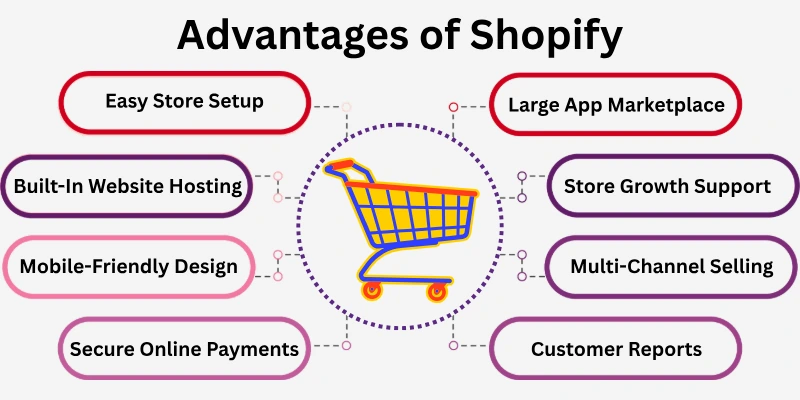
Here are some of the main benefits of using Shopify that make it a popular choice for sellers of all sizes.
- Easy Store Setup
- Built-In Website Hosting
- Mobile-Friendly Design
- Secure Online Payments
- Large App Marketplace
- Multi-Channel Selling
- Store Growth Support
- Sales and Customer Reports
- Simple Product Management
Let’s examine the pros of Shopify one by one.
1. Easy Store Setup
Starting your online store is simple because Shopify provides ready-made templates and step-by-step guidance. These tools remove the usual hassle of designing a website from scratch. You just pick a template, add your products, and organize your pages, and the platform takes care of the rest.
Even beginners can have a professional-looking store ready in just a few hours. For example, a small artisan selling handmade soaps set up her shop in one afternoon and received her first order within days. This ease lets you focus on promoting products and growing your business without stress.
Tips:
- Pick a template that matches your brand style.
- Organize products clearly so customers can browse easily.
- Preview your store on desktop and mobile.
- Add basic branding like logos and colours to look professional.
2. Built-In Website Hosting
Your store is fast and reliable because Shopify provides built-in hosting. You don’t need to buy servers or worry about downtime. The platform handles traffic spikes automatically, so your store stays online even during busy periods.
For instance, a fitness coach selling online workout plans didn’t face any crashes during peak hours. Reliable hosting makes it easier to keep customers happy and avoid technical issues that could hurt sales.
Tips:
- Use speed optimization features for faster loading.
- Back up your store data regularly.
- Monitor site performance to catch issues early.
- Let automatic updates keep your store secure.
3. Mobile-Friendly Design
Shopify automatically adjusts your store for smartphones and tablets, making browsing simple for customers anywhere. This ensures your products look great and pages are easy to navigate on all devices.
A small jewellery shop saw more sales after confirming their website worked perfectly on mobile. Mobile-friendly stores also perform better in search engines, attracting more potential buyers.
Tips:
- Preview your store on multiple devices before launch.
- Compress images for faster mobile loading.
- Keep checkout steps simple for mobile users.
- Run mobile-specific promotions to reach on-the-go shoppers.
4. Secure Online Payments
Customers feel confident buying from your store because Shopify provides secure payment options like credit cards and PayPal. Safe transactions reduce abandoned carts and build trust.
For example, a small boutique increased orders after offering multiple payment methods. Using secure payments shows professionalism and helps customers feel comfortable returning to your store.
- Enable SSL certificates for secure transactions.
- Offer at least two payment options for flexibility.
- Show trusted payment logos to encourage shoppers.
- Update payment settings regularly to prevent errors.
5. Large App Marketplace
Shopify offers thousands of apps that add features like marketing tools, inventory management, and SEO helpers. This lets you improve your store without technical skills. For instance, a tea shop used an app to track stock and send alerts when new flavours arrived. These apps save time and make managing your store easier, helping you focus on growing sales.
Tips:
- Install only apps that add real value.
- Test apps before fully implementing them.
- Check reviews to choose reliable apps.
- Use analytics apps to learn customer habits and improve your store.
6. Multi-Channel Selling
You can sell on your website, social media, and online marketplaces from one dashboard. This allows you to reach more customers without juggling multiple systems. A handmade candle shop, for example, sold on Instagram, Facebook, and their online store, all from the same platform. Multi-channel selling saves time, keeps inventory accurate, and boosts overall sales.
Tips:
- Sync inventory across all channels to avoid overselling.
- Keep branding consistent on every platform.
- Schedule posts and promotions from the dashboard.
- Track which channel performs best to focus efforts.
7. Store Growth Support
Your store can expand as your business grows because Shopify scales with traffic and product numbers. You can add more products or categories and manage increased visitors easily.
A small startup began with a few items and later added multiple categories without issues. Scalable tools let you grow without switching platforms, protecting your investment.
Tips:
- Plan product categories in advance for smooth growth.
- Track sales trends to make better decisions.
- Upgrade features as traffic and orders increase.
- Automate tasks like stock updates and invoices.
8. Sales and Customer Reports
Shopify provides analytics showing sales, visitor behaviour, and customer trends. This helps you make smarter business decisions. For example, a bakery used reports to identify their most popular cakes and ran targeted promotions, increasing revenue. Knowing your store’s data also helps plan marketing strategies and predict future sales.
- Review reports weekly to spot trends early.
- Offer promotions based on customer behaviour.
- Combine analytics with marketing to boost sales.
- Export reports to track growth over time.
9. Simple Product Management
Managing products is easier because Shopify lets you add, organize, and update them quickly. You can track stock, add descriptions, and set up collections all in one place. For instance, a small clothing shop used these tools to manage hundreds of items efficiently. This keeps your store organized and ensures customers always see accurate product availability.
- Use clear product titles and descriptions to boost sales.
- Organize items into categories or collections.
- Update stock levels regularly to prevent overselling.
- Add high-quality images to attract buyers.
Shopify Limitations
Shopify offers many benefits that make it easy to start and grow an online store. However, like any platform, it also comes with some drawbacks that you should be aware of before getting started.
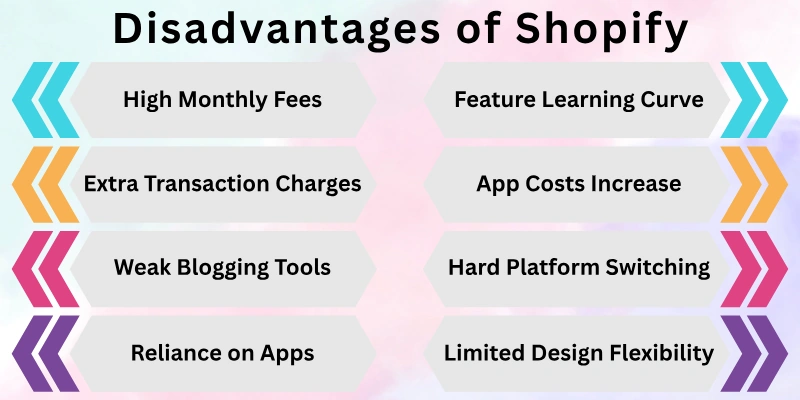
Here are some disadvantages of Shopify you should know.
- High Monthly Fees
- Extra Transaction Charges
- Limited Design Flexibility
- App Costs Increase
- Feature Learning Curve
- Reliance on Apps
- Weak Blogging Tools
- Hard Platform Switching
Let’s look at them in detail.
1. High Monthly Fees
Shopify charges a monthly subscription for every store, and the cost can feel high for small businesses or beginners. Even basic plans require consistent payments, which can add up over time. For example, a hobby seller who just started selling candles realized the monthly fee took a significant portion of their early profits. It’s important to factor this into your budget before committing.
Tips:
- Start with the basic plan and upgrade only when needed.
- Compare plan features to pick the one that suits your business.
- Monitor monthly costs to avoid overspending.
- Consider seasonal promotions to cover subscription fees.
2. Extra Transaction Charges
If you don’t use Shopify Payments, extra transaction fees apply to every sale. This can reduce your profit margin, especially for small orders. For instance, a small boutique selling handmade scarves noticed a few dollars lost on each sale when using a third-party payment gateway. Understanding this cost helps plan pricing strategies better.
Tips:
- Use Shopify Payments to avoid extra fees.
- Factor transaction fees into product pricing.
- Consider offering free shipping or discounts strategically.
- Track total fees to understand their impact on profit.
3. Limited Design Flexibility
While Shopify offers templates, fully customizing them can be limited without extra coding or apps. This can restrict creativity if you want a completely unique store. For example, a fashion startup wanted a special homepage layout but had to rely on an app to achieve it. Knowing these limits helps set realistic design expectations.
Tips:
- Choose a template that closely matches your vision.
- Use apps to add design features without coding.
- Focus on branding elements like colours and images.
- Test layouts before going live to avoid confusion.
4. App Costs Increase
Many Shopify features require third-party apps, which can increase monthly costs. Adding several apps for marketing, SEO, or inventory can make running the store more expensive than expected. For instance, a small food store needed apps to manage stock and promotions, which added extra monthly payments. Planning app use carefully helps control expenses.
Tips:
- Install only essential apps to reduce costs.
- Look for apps with free or trial versions.
- Compare app pricing before committing.
- Monitor app usage to remove unnecessary ones.
5. Feature Learning Curve
Some Shopify features, like advanced reporting or theme customization, take time to learn. Beginners might feel overwhelmed initially. For example, a new dropshipping seller struggled to set up automated emails at first but learnt it gradually. Patience and practice make these tools manageable over time.
Tips:
- Follow Shopify tutorials for step-by-step guidance.
- Start with basic features and explore advanced ones later.
- Join online communities or forums for support.
- Practice regularly to gain confidence.
6. Reliance on Apps
To add extra functionality, many stores rely heavily on third-party apps. This can make the system more complex and dependent on external tools. For instance, an online bakery used multiple apps for stock, marketing, and shipping management, which required extra setup and coordination. Planning app use wisely avoids unnecessary complexity.
Tips:
- Keep apps organized and remove unused ones.
- Test new apps before full implementation.
- Check app reviews for reliability.
- Combine apps with Shopify’s built-in tools where possible.
7. Weak Blogging Tools
Shopify’s blogging features are basic compared to dedicated platforms. You can write posts, but advanced options like custom layouts or SEO tools are limited. For example, a small lifestyle blogger had to use an app to create attractive blog layouts. If content marketing is important, this limitation should be considered.
Tips:
- Use apps to enhance blog design and SEO.
- Focus on quality content rather than complex layouts.
- Link blogs to products to boost traffic.
- Schedule posts consistently for better engagement.
8. Hard Platform Switching
Moving your store to another platform later can be challenging. Data migration, design transfer, and app replacement take time and effort. For example, a retailer wanted to switch from Shopify to another platform but faced difficulties exporting orders and products. Knowing this limitation helps plan long-term business strategy.
Tips:
- Plan your store structure carefully from the start.
- Regularly back up product and customer data.
- Consider long-term growth when choosing Shopify.
- Keep records of apps and integrations for easier migration if needed.
FAQs: Pros and Cons of Shopify
This FAQ section answers common questions about the advantages and disadvantages of Shopify to help you make an informed decision.
Shopify is a platform that helps you create and run an online store. You can:
- List products and manage inventory
- Accept payments safely from customers
- Sell online and in person without needing technical skills
Yes! Shopify is great for small businesses because it combines hosting, payments, and store management in one place. Beginners can set up a professional shop quickly and focus on selling instead of dealing with technical problems.
Shopify charges a monthly fee depending on the plan you choose. Keep in mind:
- Extra apps or advanced tools can increase costs
- Transaction fees may apply if you don’t use Shopify Payments
- Budgeting carefully is important for small businesses
Yes, Shopify allows you to sell on multiple channels from one dashboard. You can:
- Connect your store to Instagram and Facebook
- Sync orders and inventory automatically
- Reach more customers without extra effort
No, Shopify is beginner-friendly. It has ready-made templates and simple tools to help you:
- Set up your store quickly
- Add products and organize pages
- Manage orders without coding knowledge
Shopify does let you create blog posts, but the tools are basic compared to other platforms. If you rely on content marketing, the blogging features may feel limited. You might need apps to improve your blog’s design or SEO.
Shopify may charge extra fees on transactions if you don’t use Shopify Payments. For example:
- You might pay a small percentage per sale
- Fees can reduce profit margins on small orders
- Using Shopify Payments helps avoid these extra charges
Final Words
In this guide, we have covered the pros and cons of Shopify. While Shopify offers many advantages like easy setup, reliable hosting, and multi-channel selling, it also comes with limitations such as costs, reliance on apps, and some design restrictions.
By planning your budget, choosing essential apps wisely, and focusing on what matters most for your business, you can enjoy its benefits while minimizing the risks.
We hope this guide helps you make an informed decision, and we wish you all the best in your online business journey!





- Be Respectful
- Stay Relevant
- Stay Positive
- True Feedback
- Encourage Discussion
- Avoid Spamming
- No Fake News
- Don't Copy-Paste
- No Personal Attacks
- Be Respectful
- Stay Relevant
- Stay Positive
- True Feedback
- Encourage Discussion
- Avoid Spamming
- No Fake News
- Don't Copy-Paste
- No Personal Attacks
