Pros and cons of LinkedIn for Career Growth and Opportunities
Published: 17 Mar 2026
Finding meaningful connections or job opportunities online isn’t always easy. Many professionals join LinkedIn hoping to grow their careers, but they often get frustrated. Learning the pros and cons of LinkedIn can save you from wasted time and missed opportunities.
This guide will highlight both the advantages and disadvantages of LinkedIn, helping you focus on strategies that actually work, improve networking, and enhance your professional presence on the platform.
Let’s jump straight into it.
Advantages of LinkedIn
LinkedIn offers many benefits for professionals. These advantages can help you build a career, grow your network, and expand your skills.
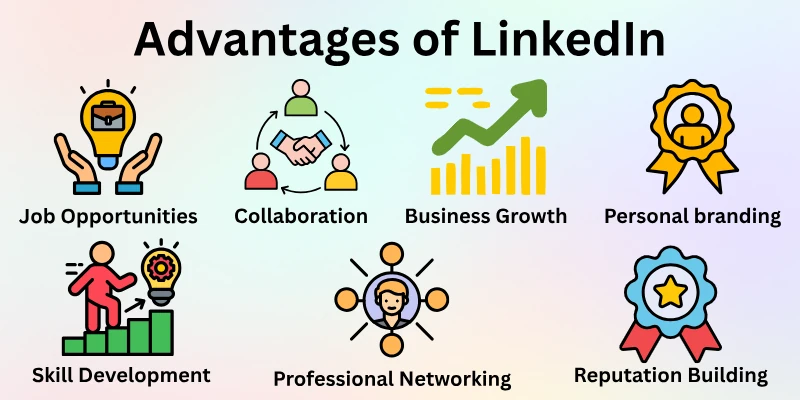
To understand how is LinkedIn useful, we’ll look at its advantages, practical tips, and real-life examples.
- Professional Networking
- Job Opportunities
- Personal branding
- Learning and Skill Development
- Business Growth and Marketing
- Global Exposure
- Access to Industry Insights
- Collaboration Opportunities
- Reputation Building
- Easy Research on Companies and Industries
Let’s break down the benefits of using LinkedIn and understand why it’s so valuable for professionals.
1. Professional Networking
LinkedIn is mainly about building professional connections. It helps you connect with people who matter to your career, not just for casual chats.
- Stay connected with old classmates and past coworkers
- Join groups related to your industry
- Send friendly, personal messages to new connections
- Like and comment on posts to stay active
Example: A marketing expert reconnected with college friends and found a mentor who helped them move into a better job.
2. Job Opportunities
LinkedIn makes job searching easier and faster. Many companies post jobs here, and recruiters often look for candidates directly.
- Keep your profile updated with skills and experience
- Turn on job alerts for roles you want
- Write a clear headline that shows what you do
- Apply for jobs directly on the platform
Example: Many fresh graduates found their first jobs through LinkedIn instead of sending resumes blindly.
3. Personal Branding
Your LinkedIn profile shows who you are professionally. When used well, it can open doors to new chances.
- Share your work wins and achievements
- Ask coworkers for recommendations
- Write a strong summary about your experience
- Join discussions to share your thoughts
Example: A developer who shared coding tips regularly caught the attention of recruiters.
4. Learning and Skill Development
LinkedIn helps you keep learning without leaving the platform. You can improve your skills and stay updated with trends.
- Follow experts in your field
- Take short courses on LinkedIn Learning
- Read posts about new tools and ideas
- Practice what you learn in real work
Example: A designer learnt new design skills from LinkedIn courses and quickly got freelance work.
5. Business Growth and Marketing
For business owners, LinkedIn is a great place to build trust and reach clients.
- Share updates about your services
- Connect with possible clients
- Post helpful tips and success stories
- Use images and videos to get more attention
Example: A small business owner gained more clients by sharing weekly tips and replying to comments.
6. Global Exposure
LinkedIn helps you connect with people from different countries. This can lead to learning and work opportunities worldwide.
- Follow international companies and professionals
- Join global groups
- Share your work to reach a wider audience
- Learn from people with different experiences
Example: A business owner found international clients and expanded their work beyond their home country.
7. Access to Industry Insights
LinkedIn keeps you informed about what is happening in your industry.
- Follow company pages for updates
- Read posts from industry experts
- Join polls and discussions
- Use this knowledge for interviews and meetings
Example: A job seeker researched a company on LinkedIn and impressed the interviewer with strong knowledge.
8. Collaboration Opportunities
LinkedIn helps people find partners for projects and teamwork.
- Join groups focused on collaboration
- Share your project ideas
- Comment on posts to start conversations
- Reach out to people with similar interests
Example: A researcher met professionals from other countries and worked with them on a shared project.
9. Reputation Building
Being active on LinkedIn helps people see you as reliable and skilled.
- Share helpful tips often
- Join meaningful conversations
- Collect recommendations from others
- Show your skills in a natural way
Example: A finance expert gained recognition by sharing market tips and was invited to speak at events.
10. Easy Research on Companies and Industries
LinkedIn makes it easy to learn about companies before applying or pitching your services.
- Check company pages for updates
- View employee profiles to understand work culture
- Prepare better for interviews
- Study trends to plan your next move
Example: A job seeker used LinkedIn research to customize applications and got better responses.
Disadvantages of LinkedIn
LinkedIn is a useful platform, but it also has its downsides. Knowing these drawbacks helps you use LinkedIn in a smarter way and avoid common problems.
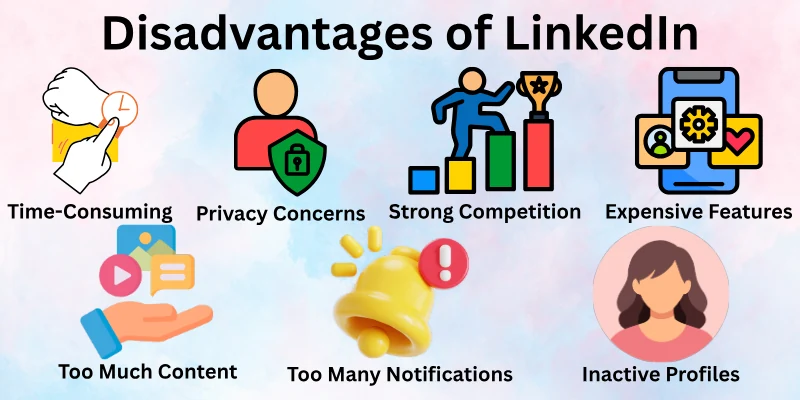
Here’s a detailed list of LinkedIn cons.
- Time-Consuming
- Low Engagement for New Users
- Privacy Concerns
- Strong Competition
- Expensive Premium Features
- Too Many Notifications
- Pressure to Look Successful
- Fake or Inactive Profiles
- Too Much Content
- Unwanted Sales Messages
Let’s review LinkedIn drawbacks.
1. Time-Consuming
LinkedIn can quietly eat up your time. Scrolling through posts, replying to messages, and checking notifications can turn into hours if you are not careful.
- Decide fixed times to use LinkedIn
- Focus only on useful tasks like networking or learning
- Avoid scrolling without a clear goal
- Keep an eye on how much time you spend
Example: A marketer spent hours reading posts but got no real results. Setting a schedule helped them stay focused.
2. Low Engagement for New Users
If you are new, getting attention can be hard. With fewer connections, your posts may not reach many people at first, which can feel discouraging.
- Connect with classmates, coworkers, and mentors first
- Share helpful and useful content
- Comment on other people’s posts to get noticed
- Join active groups to grow your network
Example: A fresh graduate got little response at first, but engagement improved after joining groups and connecting with alumni.
3. Privacy Concerns
LinkedIn is mostly public, which means your work details are visible to many people. This can lead to unwanted messages or misuse of information.
- Adjust privacy settings carefully
- Share personal details only with trusted connections
- Avoid posting sensitive company information
- Review connection requests before accepting
Example: Some users receive unwanted messages because their profiles are open to everyone.
4. Strong Competition
With millions of professionals on LinkedIn, standing out is not easy. Job roles, clients, and opportunities often attract many people at the same time.
- Clearly show what makes you different
- Send personal and thoughtful messages
- Collect recommendations and endorsements
- Keep updating your skills
Example: Two people applied for the same job, but the one with a complete and active profile got noticed first.
5. Expensive Premium Features
LinkedIn offers paid plans with extra tools, but they can be costly, especially for beginners or small businesses.
- Use the free version first
- Upgrade only if you really need advanced tools
- Explore all free features before paying
- Use learning features wisely if you subscribe
Example: A freelancer avoided premium at first, then later used it only when it helped reach clients.
6. Too Many Notifications
LinkedIn sends many alerts every day. These can interrupt your work and reduce focus.
- Change notification settings
- Check LinkedIn at set times
- Turn off unnecessary group alerts
- Focus only on important messages
Example: A business owner felt distracted until they limited notifications to important updates only.
7. Pressure to Look Successful
Seeing others share achievements can create pressure. You may feel the need to appear perfect, even when you are still learning.
- Share progress honestly
- Avoid comparing yourself to others
- Post only when it feels meaningful
- Use LinkedIn for learning, not competition
Example: A young professional felt stressed but later focused on their own growth instead of others’ success.
8. Fake or Inactive Profiles
Not everyone on LinkedIn is active or genuine. Some profiles are fake or unused, which can waste your time.
- Check profiles before connecting
- Engage with active users only
- Avoid suspicious messages
- Look for recommendations and activity
Example: A consultant realized many connections were inactive, which reduced networking value.
9. Too Much Content
LinkedIn is full of posts and updates. Without filtering, it can feel overwhelming and unhelpful.
- Follow only relevant people
- Unfollow content that adds no value
- Focus on useful posts
- Limit how often you check the feed
Example: A graduate improved their feed by following only industry experts.
10. Unwanted Sales Messages
Some users send spam or pushy sales messages. These can waste time and break focus.
- Accept connections carefully
- Ignore or block spam accounts
- Keep contact details private
- Talk only with people who match your goals
Example: A startup founder reduced spam by being selective with connections.
How to Create an Effective LinkedIn Profile
Your LinkedIn profile is like your online professional card. A good profile helps people notice you, connect with you, and trust your skills.
Here’s how to make it effective:
- Use a Professional Photo: Choose a clear, friendly photo. Dress properly and smile naturally. Avoid selfies or casual pictures.
- Write a Strong Headline: The headline is under your name. Write your job, skills, or field clearly. Keep it short and simple. Example: “Graphic Designer | Social Media & Branding Expert”
- Make a Short Summary: Tell who you are, what you do, and your main skills. Add your achievements and what you want to do next. Keep it clear and easy to read.
- Show Your Experience: List your jobs or projects. Focus on what you achieved, not just what you did. Add bullet points and numbers if possible.
- Add Skills and Get Endorsements: Add 5–10 skills you are good at. Ask colleagues or friends to endorse them. Update skills as you learn more.
- Get Recommendations: Ask managers or teammates to write short recommendations. Good recommendations build trust and make your profile stronger.
- Customize Your URL: Make your LinkedIn link simple, like linkedin.com/in/yourname. It looks professional and is easy to share.
- Stay Active: Post updates, share articles, and comment on others’ posts. Join groups and participate in discussions. Being active keeps your profile visible.
Tip: Update your profile regularly with new skills, jobs, or projects to stay relevant.
FAQs: Pros and Cons of LinkedIn
Here’s a list of questions many professionals have about LinkedIn pros and cons:
Yes, creating a LinkedIn profile is a smart move for anyone looking to grow professionally. It helps you showcase your skills, connect with industry professionals, and discover job opportunities. Even beginners can benefit from starting small and gradually building their network.
LinkedIn allows you to network, learn, and promote your skills in a professional environment. You can find job opportunities, join groups, and follow industry leaders to stay updated. Overall, the platform helps you grow your career and professional reputation.
LinkedIn connects you directly with recruiters and companies looking for talent. You can apply for jobs, set alerts for relevant positions, and even get noticed through a strong profile. Regular activity and a complete profile increase your chances of being hired.
Absolutely. LinkedIn lets you share achievements, post insights, and showcase your professional skills. This helps you build credibility, attract opportunities, and stand out in your industry.
Yes, LinkedIn is a valuable platform for businesses to market services, share updates, and build a professional brand. Companies can connect with potential clients and partners while demonstrating industry expertise. It’s especially useful for B2B growth and networking.
Some LinkedIn users may face privacy concerns if they overshare personal or professional information. Adjusting privacy settings and being selective with connections can protect your data. Using LinkedIn responsibly minimizes these risks.
Start by completing your profile, adding relevant skills, and connecting with people you know. Join industry groups, post helpful content, and engage with others’ posts. Small, consistent actions can help beginners gradually build a strong presence.
Final Thought
In this guide, we have covered the pros and cons of LinkedIn. While LinkedIn offers excellent networking, learning, and career growth opportunities, it also comes with challenges like time management, competition, and privacy concerns.
My recommendation is to focus on the benefits while carefully managing the risks by setting limits, protecting your information, and using the platform strategically.
Remember to stay active but avoid distractions, and you’ll get the most value from LinkedIn.

- Be Respectful
- Stay Relevant
- Stay Positive
- True Feedback
- Encourage Discussion
- Avoid Spamming
- No Fake News
- Don't Copy-Paste
- No Personal Attacks
- Be Respectful
- Stay Relevant
- Stay Positive
- True Feedback
- Encourage Discussion
- Avoid Spamming
- No Fake News
- Don't Copy-Paste
- No Personal Attacks
